
Blog

Blog - Categories & Tags

Organize posts into categories and tags so readers and search engines can find them.

Beginner4 min read

Categories and Tags group your posts so people can browse a topic and search engines understand your site — and AI keeps them tidy for you.

Where to find it: Left menu → Marketing → Web → Blog → Categories / Tags (the page is titled Blog Management). Part of the Blog guide.
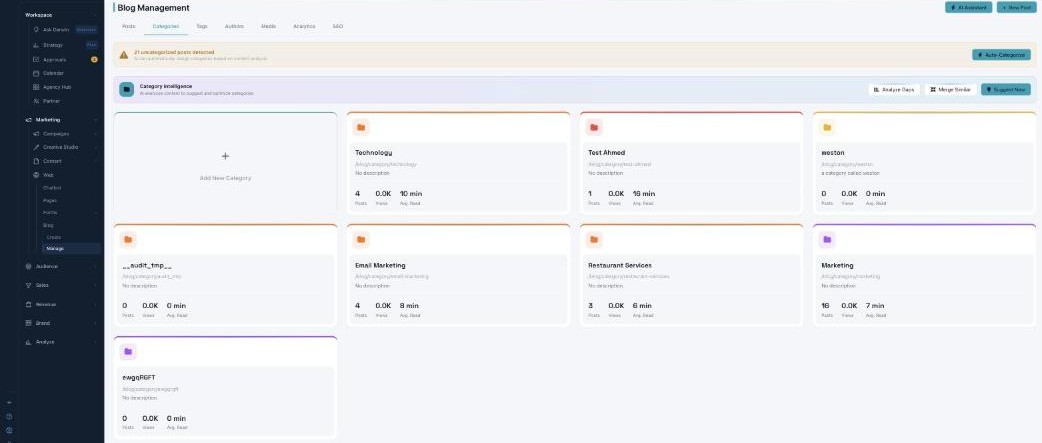
The Categories tab: a Category Intelligence bar (Auto-Categorize, Analyze Docs, Merge Similar, Suggest New) above category cards showing posts, views, and average read time.

Categories & Tags — keep your blog tidy and findable.

Categories

Add New Category with a name, an auto-generated URL slug, a description, and a color. Each card shows its Posts, Views, and Avg. Read. Category Intelligence does the housekeeping: Auto-Categorize uncategorized posts, Merge Similar duplicates, and Suggest New categories from your content (accept or dismiss each).

Tags

Tag Intelligence tracks your Total, Used, Unused, and Duplicate tags so you can clean them up. Add a tag with a name, slug, and color, Merge overlapping tags, and browse Tag Clusters to see related groups.

What’s next

Keep reading

picked for you
  • Blog - Analytics

    See what your blog drives — views, visitors, time on page, leads, and conversions.

  • Blog - Authors

    Author profiles power bylines and bios — and train an AI Ghostwriter to match each voice.

  • Blog Management

    A complete blogging platform — write posts with AI, organize them, publish to your site and social channels, and rank on Google and AI search engines.

Still stuck? We’ve got you.

Pick whatever suits you — watch it, ask it, or talk to a real person.

Watch a video

Short courses recorded in the product, in the Marketing Titan Academy.

Ask Darwin

Signed in, ask the built-in assistant to explain a screen or do the step for you.

Talk to a person

Not covered here? Send us a note and someone on the team will answer.

Try it yourself

Every guide here describes the live product.

Start free and follow along: every core module, unlimited users, no card required.