
Local search visibility
Plumbing searches are highly local and urgent; being found in the right suburbs matters most for emergency jobs.
MeasureMap pack impressions and website visits from local search
Give Darwin a goal, an offer and a timeline. It drafts the whole strategy — KPI targets, segments, budget split, channel roles and a phased plan — you revise it by prompt, 22 agents run it, and the report tracks results against the plan you approved.
Then it writes the win-back email, finds the budget quietly bleeding out, and puts it in front of you finished, waiting for one click.
Paste your website. Darwin drafts a first 90-day plan: three priorities, who does what, and a sample email and ad written in the business’s own voice — each one waiting for approval, like everything it makes.
Darwin reads your public home page and drafts a first plan in about 20 seconds. Nothing is posted, sent or saved to an account.
Sample plan · fictional home services business · drafted by Darwin
Family-run licensed plumbing company offering emergency repairs, drain cleaning, water heater work, and bathroom remodels. Sells to: Homeowners in a mid-size US city and its suburbs who need reliable, upfront-priced plumbing help.
Plumbing searches are highly local and urgent; being found in the right suburbs matters most for emergency jobs.
MeasureMap pack impressions and website visits from local search
24/7 emergency claim only pays off if calls after hours actually convert into booked jobs.
MeasurePercentage of after-hours calls that result in a booking
Winter freeze checks and spring sump pump service are named offers that can fill slower periods.
MeasureBookings tied to seasonal campaign links or promo codes
Is your home ready for freezing temperatures?
Winter is coming, and frozen pipes can turn into a costly repair fast. At Harbor Line Plumbing, we offer winter pipe freeze checks so small issues get caught before they become emergencies. We're family-run, licensed and insured, with upfront flat-rate pricing, so you know the cost before we start. Book your freeze check online or give us a call. Our vans are on the road serving the city and surrounding suburbs, ready when you need us.
Flat-Rate Plumbing, No Surprises
Family-run, licensed and insured plumbers serving the city and suburbs. Emergency repairs, drain cleaning, water heaters, and remodels. Upfront pricing every time.
Book Online NowAssumptions Darwin made: Assume mid-size city means service area of roughly 20-30 mile radius. · Assume most customers are residential homeowners, not commercial or property managers. · Assume current online booking and review presence is minimal since not described on site.
Ask Darwin a question and it answers from your CRM and campaign data, says why, and drafts what it would run. It ends where every answer ends: nothing is sent until you approve it.
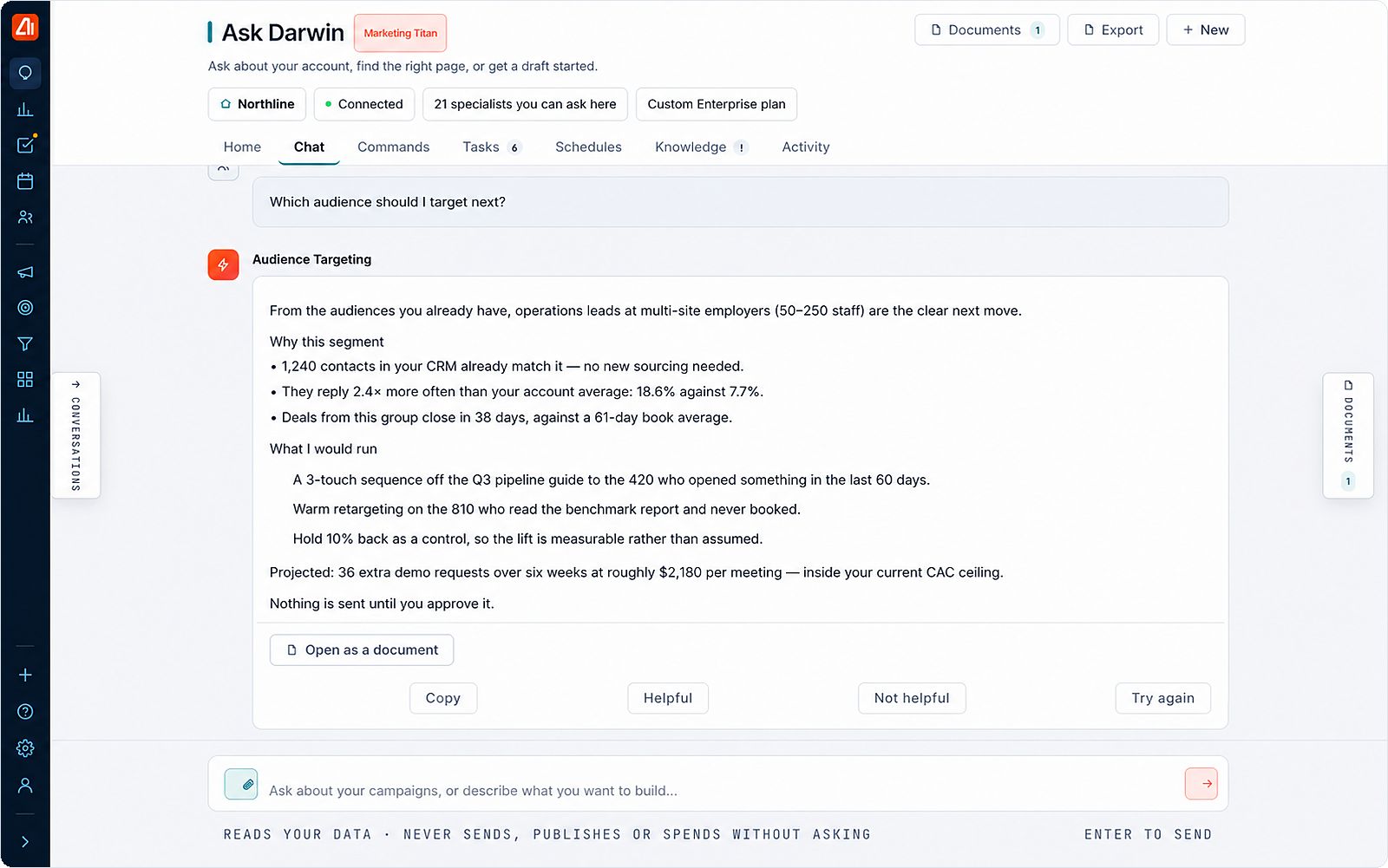
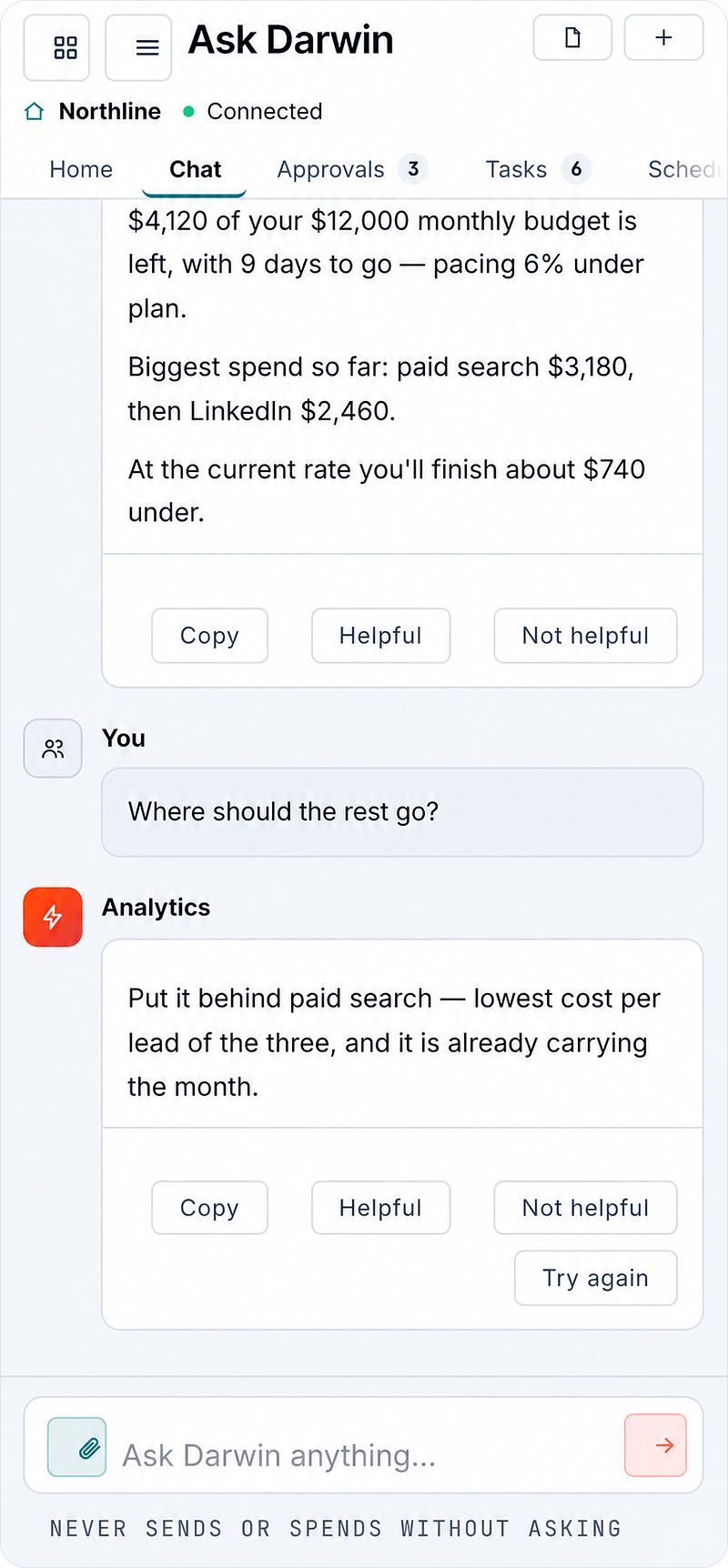
Darwin executes across every channel, so the loop runs end to end. The steps that are human by design stay that way: assets wait in approvals before anything goes out, and SDR outreach SMS and calls run behind consent and do-not-call checks.
The four things that normally live in a strategist’s head, written down where the report can track them.
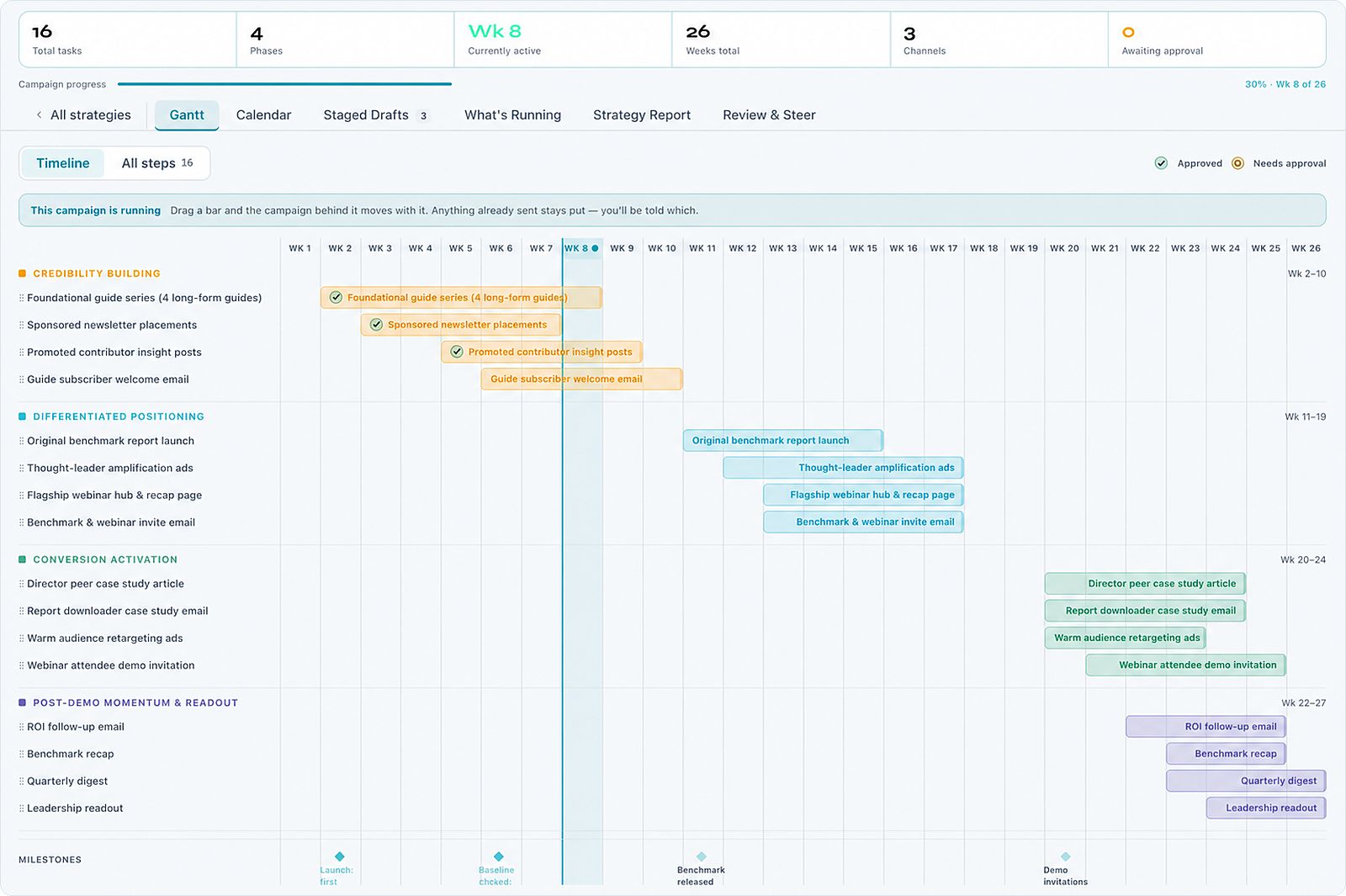
A dashboard shows what happened. It rarely shows whether what happened is what you planned, which is why nobody can say when to change course. The strategy report compares real results from your live campaigns against the targets you approved — projected versus actual, by week and by channel.
When there is no data yet, it says so. Darwin does not fill a gap with a plausible number, which is the same rule that governs every other answer it gives you — and the reason a projection here can be put in front of someone who will check it.
The Monday briefing is ready before you are — Darwin has already been through the budgets, the lapsed customers and the overdue invoices nobody gets round to.
Pacing, burn rate, and where the month actually lands — before it lands. Not a dashboard you have to remember to open.
Lapsed buyers, abandoned carts, leads that went cold while everyone was busy. With the win-back already written.
Who owes you, how long it has been, and a reminder drafted and ready to send.
Most of this is work nobody had time for. That is the point — it is not replacing what you do, it is doing the part that kept slipping.
Every AI gives you an answer. Ask two of them something neither can know — only one tells you. Pick a question.
This is why you can put its numbers in a board deck. Whole categories of feature in this product are switched off at the model layer for exactly this reason — they worked, and what they returned was invented. We found them in our own product and took them away from the AI. See them →
The left-hand column illustrates a common failure mode in AI assistants generally. It is not the output of any named product.
These are not among the 174 tools our 22 agents reach. They all worked — that was the problem. Each one returned a confident, plausible answer that nothing in your account supports, so it was taken away from the model rather than patched. Below is the category, and what it used to invent.
Every AI product has these. Most ship them. We found ours, counted them, and took them away from the model — because a confident wrong answer is worse than no answer, and much harder to catch.
Reads your account, writes the thing, and shows you exactly what goes out — recipients, subject, body, spend.
Nothing sends, publishes or spends without a person. Every tool that can send, publish or spend sits behind the approvals queue, and the AI cannot reach past it.
If anything changed between your approval and the moment it runs — a budget moved, a list grew — it stops and asks to be re-approved. If it can’t prove what you approved, it refuses to run at all.
Step 3 is the one that matters. An approval is given for a specific set of facts. If the facts move, the approval isn’t valid any more.
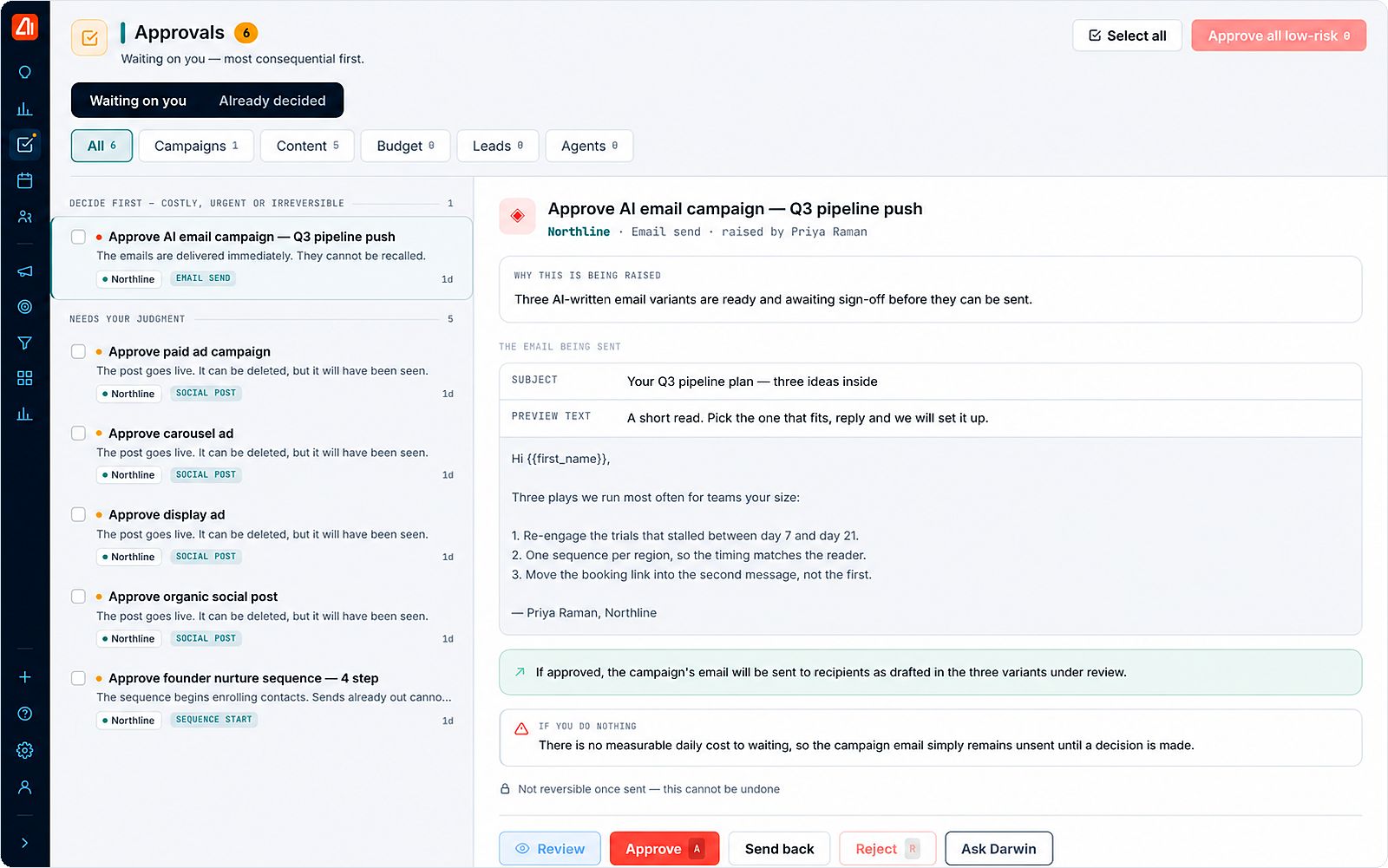
Every request, plan, agent execution, data change and approval is recorded with who and when — retained and exportable. If procurement asks what happened and who signed it off, the answer is a file, not a recollection.
Stop every agent across the organisation immediately. In-flight actions roll back. One click, no ticket, nothing to uninstall or reconfigure afterwards.
The fear was never that AI writes a bad email — it’s that it sends one to 40,000 people. Every action is gated by default; you raise the dial per agent and per action, only where you want to.
Ask about a campaign and the Campaign Manager answers. Ask about receivables and Invoicing does. Ask something that spans everything and the Executive Assistant takes it, with every capability available to it.
Not a chatbot with a search box bolted on — each question is routed to the specialist that holds the data.
Autonomy is a setting, not a plan tier. Set it per campaign, per module or across the whole workspace, and change it whenever you like.
Every module keeps a full manual path. Build the campaign yourself and use the AI for nothing more than a second opinion.
Nothing runs unless you run it
The default. Agents research, write and schedule, then everything waits in your approvals queue until someone signs off.
Default on every plan
Hand over end-to-end execution within the limits you set — budget caps, send windows, channels, spend. Stop it in one click at any time.
You set the limits first
Most vendors quote an agent count. We built 153 agent classes. We shipped 22 — the ones that could actually read your account. The other 131 couldn’t, so putting them in a brochure would have meant inventing a number, which is the one thing this product doesn’t do.
Ask any vendor quoting a big number how many of theirs reach your data. They will not know. We went and counted.
A builder makes one campaign from a prompt. Darwin decides targets, audiences, spend and channel mix first, then every campaign comes from that plan — and the report measures against it.
All of them — email, sequences, social, ads, content, outreach and calls. Assets wait in approvals before anything goes out, and SDR outreach SMS and calls run behind consent and do-not-call checks.
It does the work — writes the campaign, finds the overspend, drafts the win-back. What it can’t do is send it without you. That’s deliberate: everything it touches costs money or reaches a customer.
Because it tells you when it doesn’t know. Every figure comes out of your account, and when a number isn’t there it says so. Whole categories of feature that returned plausible invented answers are switched off at the model layer rather than patched.
Ask it something it can’t know, then ask this one. That’s the difference, and it takes ten seconds.
A chatbot searches. This routes your question to the specialist that owns that data — 22 specialists reaching 174 tools. Ask about receivables and Invoicing answers, not a search box.
Landing-page and web analytics aren’t tracked in the platform, so it won’t report them. It isn’t connected to your mail, so it can’t search your inbox. It says so rather than estimating.
No. It proposes and a person approves — and if the facts change between approval and execution, it stops and asks again.
It reads your account before you get in. Then it drafts the work and waits for your click.