
The All Campaigns view is every campaign you run — email, ads, social, carousel, display, and sequences — in one list, so you can see what’s live, what’s paused, and what needs attention without jumping between tools.
Where to find it: Left menu → Marketing → Campaigns → All campaigns. Part of the Campaign Hub.
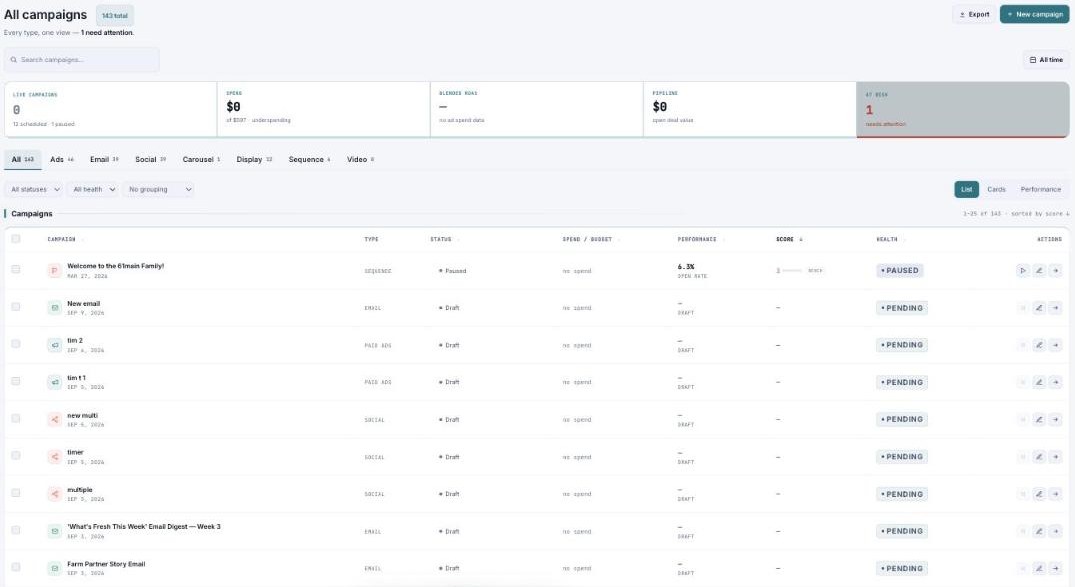
Every campaign type in one view, with health and score on each row.
Your top-line numbers
Cards across the top give you the state of everything at once: Live Campaigns (with how many are scheduled or paused), Spend against budget, Blended ROAS, Pipeline (open deal value), and At Risk — a count of campaigns that need attention.
Filter by type
A row of tabs filters the list to one kind of campaign — All, Ads, Email, Social, Carousel, Display, Sequence, or Video — each with its own count. Add status and health filters, group the list, or search by name.
The campaigns table
Each row shows the campaign’s name, type, status (Draft, Paused, Live), spend / budget, performance, a score, and a health badge (Pending, Paused, Healthy). The Actions on the right let you play/pause, edit, or open a campaign. Switch between List, Cards, and Performance views, or Export the list.
One view, sorted by what matters
The list sorts by score, so the campaigns most worth your attention rise to the top — and the At Risk card tells you exactly how many need a look right now.
What’s next
- Back to the Campaign Hub.
- Start a new one with New campaign.