
Approvals is your personal inbox of decisions. Anything on the platform that would send, publish, or spend money — raised by one of the AI agents or by a teammate — waits here for a human to sign off. It’s your inbox, not a brand’s: if you cover 40 brands, you clear one queue, not 40 screens.
Where to find it: Left menu → Workspace → Approvals. The nav shows a count badge of everything waiting on you.
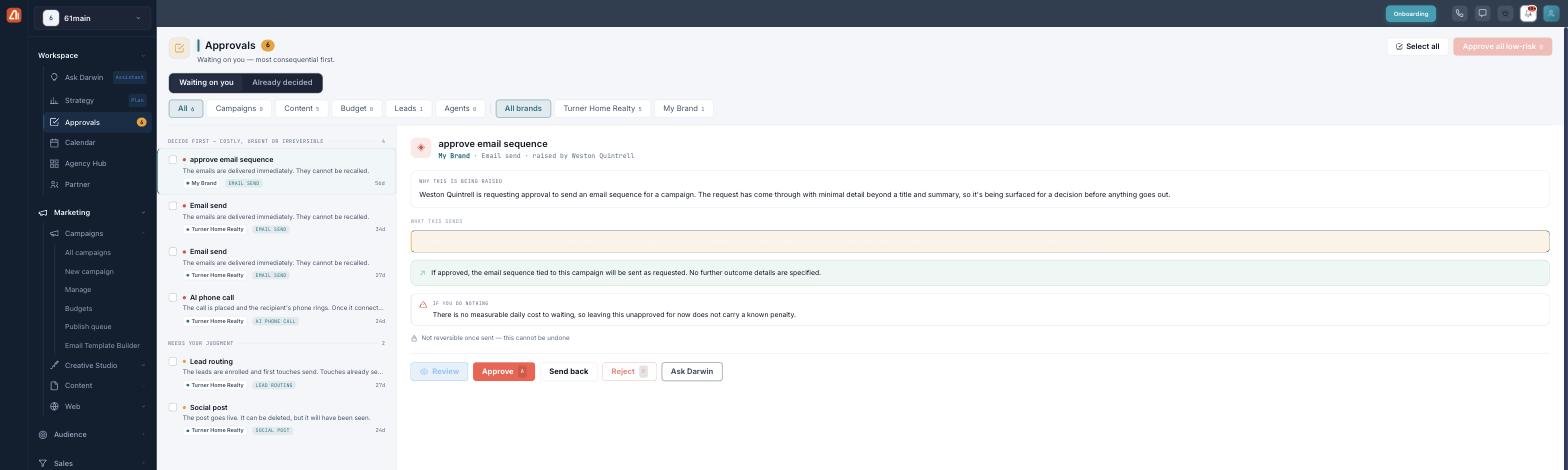
The Approvals inbox — decisions grouped by consequence, most important first.
The inbox
The header shows how many decisions are waiting on you and, when a cost is known, how much is at stake. Two views split your work: Waiting on you (the queue) and Already decided (your history). Selecting any item opens its decision panel on the right.
Sorted by consequence, not by brand
The list is grouped so the decisions that matter most are first:
| Band | What’s in it |
|---|---|
| Decide first | Costly, urgent, or irreversible — things you can’t take back. |
| Needs your judgment | Reversible, but a person should weigh in. |
| Low risk | Safe to clear in bulk. |
Filtering
Narrow the queue with the category chips — All, Campaigns, Content, Budget, Leads, and Agents — and, if you cover several, the brand chips. Every chip shows a live count (a zero still shows, so “no budget items” is clearly different from “no budget tab”). Brand is a filter, never a way the list is grouped.
What needs approval
Lots of different things route here, each tagged with its type and category:
| Category | Examples |
|---|---|
| Campaigns | Sequence start, email/social campaign drafts, paid ads, pausing a campaign. |
| Content | Email & SMS sends, social posts, blog/SEO publishing, forms, creative sign-off, AI phone calls, brand-voice updates. |
| Budget | Budget shifts and invoice sends. |
| Leads | Lead routing and audience changes. |
| Agents | Agent applications and client onboarding. |
How it works — each has its own guide
| Topic | What it covers | Guide |
|---|---|---|
| Reviewing & deciding | The decision panel, reviewing content, Approve/Reject/Send back/Ask, Undo. | Open → |
| Who can approve | Maker-checker, dual approval, spend limits, delegation, expiry, notifications. | Open → |
| Already decided & bulk | Your history, failed items, and clearing low-risk in one go. | Open → |
Nothing runs until you say so
Every item is frozen when it’s raised, routed to a named person, and notified — and anything that spends or can’t be undone makes you review it first. You can’t approve your own request, and big spends need a second approver. The AI proposes; a human decides.
What’s next
- Learn the review & decision flow.
- See who can approve and the safeguards.
- Clear the queue faster with bulk actions.