
Deals is full of AI: ask it questions in plain English, see each deal’s win probability, read its insights, and work an AI-powered follow-up dashboard.
Where to find it: Left menu → Sales → Pipeline → Deals (the Ask AI bar, AI Insights, and AI Assist). Part of the Deals guide.
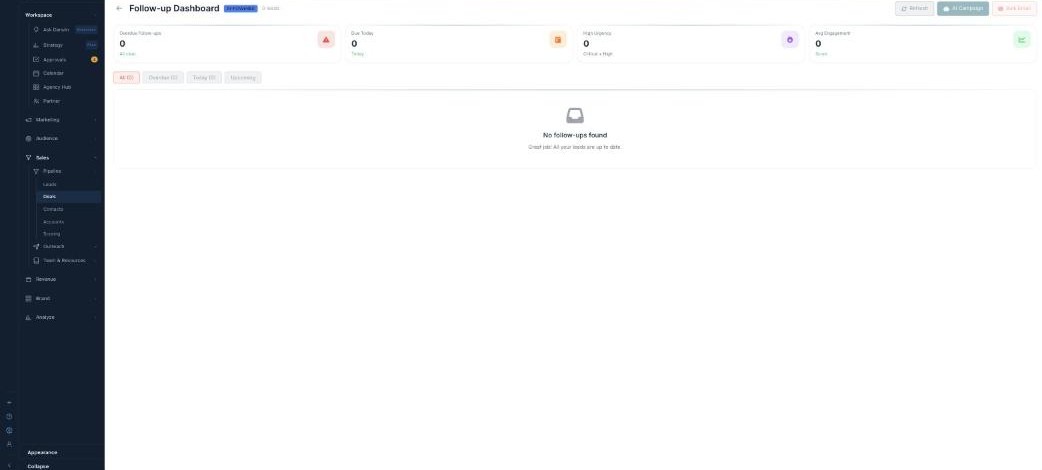
The AI in Deals — it predicts wins, flags risk, and tells you who to chase.
Ask AI
Type a plain-English question in the Ask AI bar — for example “Stalled deals over $50K” — and it builds the filter for you. Or tap a quick chip like Closing this month, High probability deals, At risk pipeline, No activity in 14 days, or Deals in negotiation. The result shows as removable pills; Clear all resets it.
AI Win % & Deal Health
Every deal gets an AI Win % — how likely it is to close — and a Deal Health signal (Healthy or At Risk). The board rolls these up into your Win Rate, Deals At Risk, and Avg Sales Cycle, and each deal also carries a Velocity (is it speeding up or stalling). You can sort or filter by win probability.
AI Insights & Recommendations
The AI Insights & Recommendations panel (marked LIVE) surfaces what needs attention — for example “27 Deals Stalled → Review & Re-engage,” “Pipeline at Risk → View At-Risk Deals,” and “Deals Need Follow-up.” Refresh for new ones, or Dismiss any you’ve handled.
The Follow-up Dashboard
AI Assist opens the Follow-up Dashboard — the AI-powered list of which deals to chase. It totals your Overdue Follow-ups, Due Today, High Urgency, and Avg Engagement, filters All / Overdue / Today / Upcoming, and lets you act with AI Auto-Schedule, Quick Call, Quick Email, or AI Campaign / Bulk Email.
What’s next
- Back to the Deals overview.
- See Table & Kanban views.
- See Pipelines & Advanced Filter.