
Deals is your CRM board for the opportunities you’re working to close. Track each deal’s value and stage, see its AI win probability, and move it through your pipeline — as a table or a drag-and-drop Kanban.
Where to find it: Left menu → Sales → Pipeline → Deals. It’s one of four connected boards — a deal usually begins as a lead you’ve qualified.
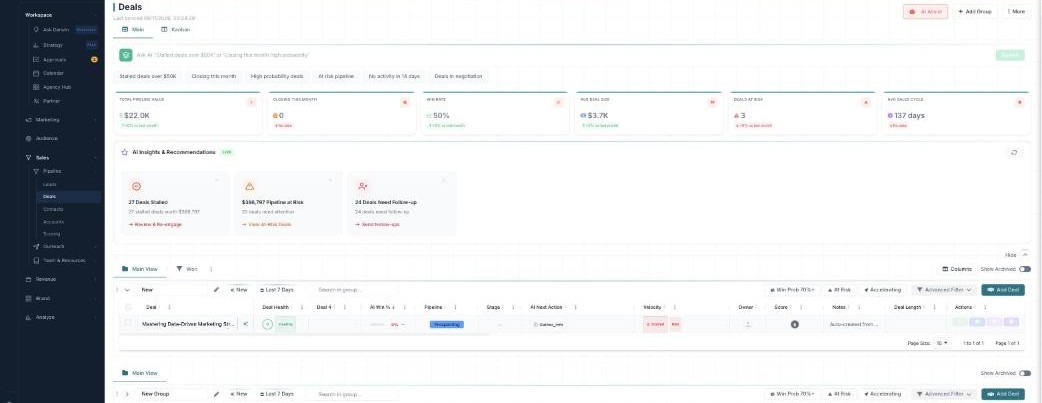
The Deals board — your pipeline value, stage, and win odds at a glance.
Two views, one board
| View | What it’s for |
|---|---|
| Main | A value-rich table of every deal — amount, stage, health, and win odds. |
| Kanban | Pipeline stages as columns — drag deals along as they progress. |
The numbers up top
The stat cards summarize your pipeline: Total Pipeline Value, Closing This Month, Win Rate, Avg Deal Size, Deals At Risk, and Avg Sales Cycle — each with how it’s trending.
Let the AI help
Three AI tools sit right on the board:
- Ask AI — type a plain-English question (“Stalled deals over $50K”) and it filters for you.
- AI Insights & Recommendations — a LIVE panel flagging stalled deals, pipeline at risk, and deals needing follow-up.
- AI Assist — opens a Follow-up Dashboard of exactly which deals to chase.
See them all, plus AI Win %, in the AI guide.
Pipelines & winning
Deals run through a pipeline whose stages are the groups on the board (New Lead → Proposal → Negotiation → Won). When a deal closes it moves to Won and flows into your Revenue. Use Add Group to add a stage, the pipeline selector to switch pipelines, and More to Import or Export.
Learn each part
| Topic | What it covers | Guide |
|---|---|---|
| Table & Kanban | The two views, columns, quick filters, and bulk actions. | Open → |
| Pipelines & Advanced Filter | Stages, switching pipelines, and precise saveable filters. | Open → |
| AI win scoring, insights & follow-ups | Ask AI, AI Win %, insights, and the follow-up dashboard. | Open → |
The AI is calling the odds
Every deal carries an AI Win %, and scoring, insights, Ask AI, and AI follow-ups are part of your plan — no per-action credits. The one thing that uses credits is Enrich Data (filling in missing contact and company details).
What’s next
- Work your deals in the table or Kanban.
- Move them through pipelines & filters.
- Let AI predict and chase them.