
A deal moves through the stages of a pipeline, and the Advanced Filter finds exactly the deals you need — and can save that view.
Where to find it: Left menu → Sales → Pipeline → Deals → Add Group / Advanced Filter. Part of the Deals guide.
Pipelines organize your deals; filters find exactly the ones you want.
Pipelines & stages
Deals run through a pipeline whose stages are the groups on the board (and the Kanban columns) — for example New Lead, Proposal, Negotiation, Won, and Lost. Add Group adds a stage, and on the Kanban the pipeline selector lets you switch between pipelines.
Advanced Filter
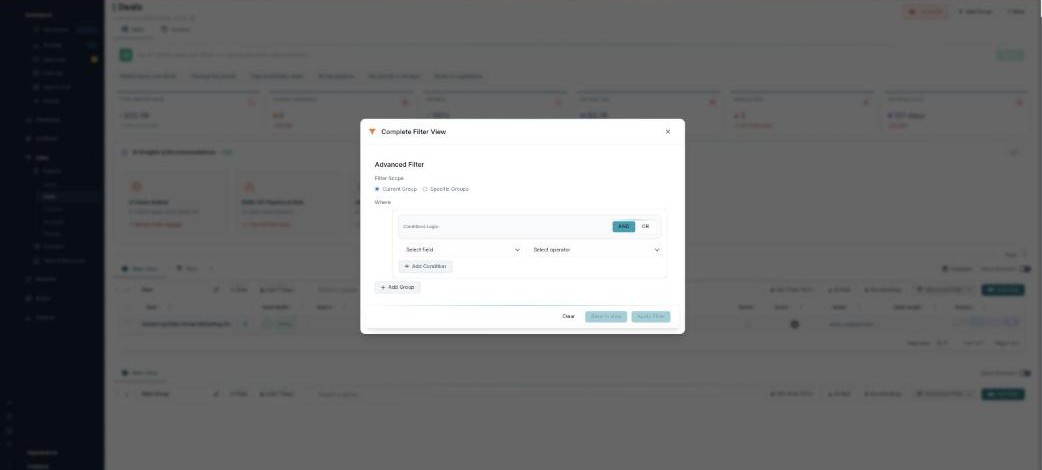
Open Advanced Filter (the Complete Filter View) to build a precise query:
- Filter Scope — search the Current Group or Specific Groups.
- Conditions — pick a field (deal value, stage, win probability, owner…) and an operator, enter a value, and combine several with AND or OR. Add Condition for more, and Add Group to nest logic.
- Apply Filter to filter now, Clear to reset.
Saving a view
Save to view keeps a filter for reuse: give it a name, choose who can see it (everyone, specific users, or private), and save it as a List View or a New Tab on the board.
What’s next
- Back to the Deals overview.
- See Table & Kanban views.
- See AI win scoring, insights & follow-ups.