
Leads is your CRM board for the people and companies who might buy from you. Track every lead, see how AI scores and prioritizes them, and move them through your pipeline — as a table or a drag-and-drop Kanban.
Where to find it: Left menu → Sales → Pipeline → Leads. It’s one of four connected boards — Leads, Deals, Contacts, and Accounts.
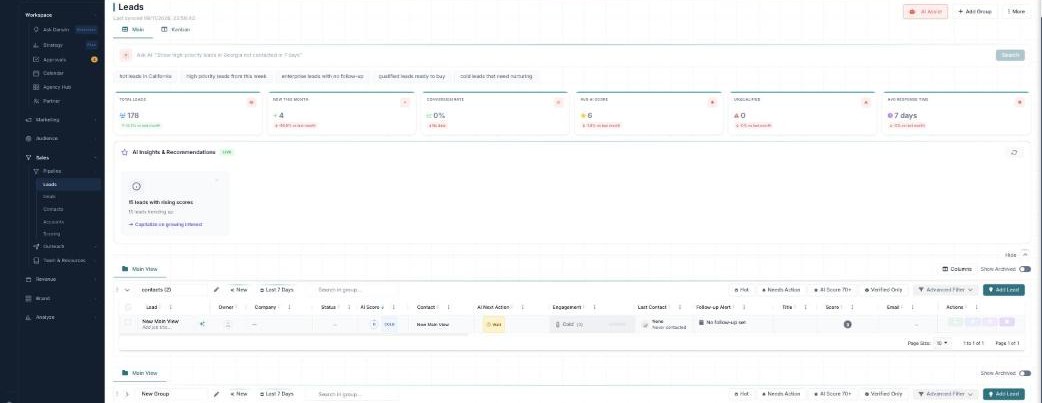
The Leads board — your pipeline, scored and searchable by AI.
Two views, one board
| View | What it’s for |
|---|---|
| Main | A spreadsheet-style table of every lead and its details. |
| Kanban | Pipeline stages as columns — drag cards to move leads along. |
The numbers up top
The stat cards summarize your pipeline at a glance: Total Leads, New This Month, Conversion Rate, Avg AI Score, Unqualified, and Avg Response Time — each with how it’s trending.
Let the AI help
Three AI tools sit right on the board:
- Ask AI — type a plain-English question (“Show high-priority leads in Georgia not contacted in 7 days”) and it filters for you.
- AI Insights & Recommendations — a LIVE panel that flags things to act on, like leads with rising scores.
- AI Assist — opens a Follow-up Dashboard of exactly who to chase.
See them all in the AI guide.
How it’s organized
Each board holds groups — your pipeline stages (New, In Progress, Next Stage, and so on), which are also the Kanban columns. As a lead progresses it can convert into a Contact and Account, and then a Deal — the four boards are linked. Use Add Group to add a stage and More to Import or Export.
Learn each part
| Topic | What it covers | Guide |
|---|---|---|
| Table & Kanban | The two views, groups, quick filters, and bulk actions. | Open → |
| Groups & Advanced Filter | Pipeline stages and precise, saveable filters. | Open → |
| AI scoring, insights & follow-ups | Ask AI, AI Score, insights, and the follow-up dashboard. | Open → |
The AI is doing the sifting
Scoring, insights, Ask AI, and AI-drafted follow-ups are part of your plan — no per-action credits. The one thing that uses credits is Enrich Data (filling in missing emails, phone numbers, and company details).
What’s next
- Work your leads in the table or Kanban.
- Organize them with groups & filters.
- Let AI score and chase them.