
Anything that didn’t deliver — a failed post, a disapproved ad, a bounced or undelivered email — lands in Needs attention so nothing quietly slips through.
Where to find it: Left menu → Marketing → Campaigns → Publish queue → Needs attention (the page is titled Publishing). Part of the Publishing guide.
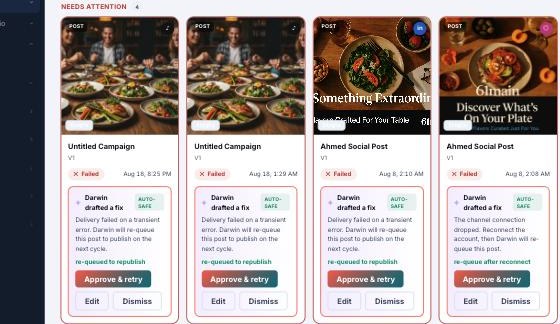
Needs attention — what failed, why, and the one-click fix.
Retry a post
For a failed organic post, Retry (or Approve & retry) re-queues it and it publishes on the next cycle. Retry failed posts (N) in the banner does this for every retryable post at once.
Ads and emails are fixed in their own tools
Paid ads and email campaigns can’t be retried from here — a disapproved ad or a bounced email is resolved in the ad manager or email tool. The banner tells you exactly how many ads and emails need action elsewhere, and clicking the item takes you to the right place to fix it.
Darwin drafts the fix
When a post fails, Darwin reads the error and drafts a fix — for example reconnect a dropped account, re-crop a carousel to a valid ratio, add missing sizes, or reword a claim. The fix is a draft, never applied on its own:
| Button | What it does |
|---|---|
| Approve & retry | Apply Darwin’s fix and re-queue the post. |
| Edit | See the raw error and change it yourself. |
| Dismiss | Ignore this one for now. |
Low-risk fixes are tagged Auto-safe; anything touching a claim always asks you to confirm before it goes out. Until you approve, the item stays in Needs attention.
What’s next
- Back to the Publishing overview.
- See Queue, Cards & Calendar views.
- See Statuses & filters.