
Create and schedule social media posts across multiple platforms from one unified dashboard.
📍 /social-media-campaigns📑 Quick Navigation
Overview Getting Started Key Features Detailed Guide Best Practices FAQ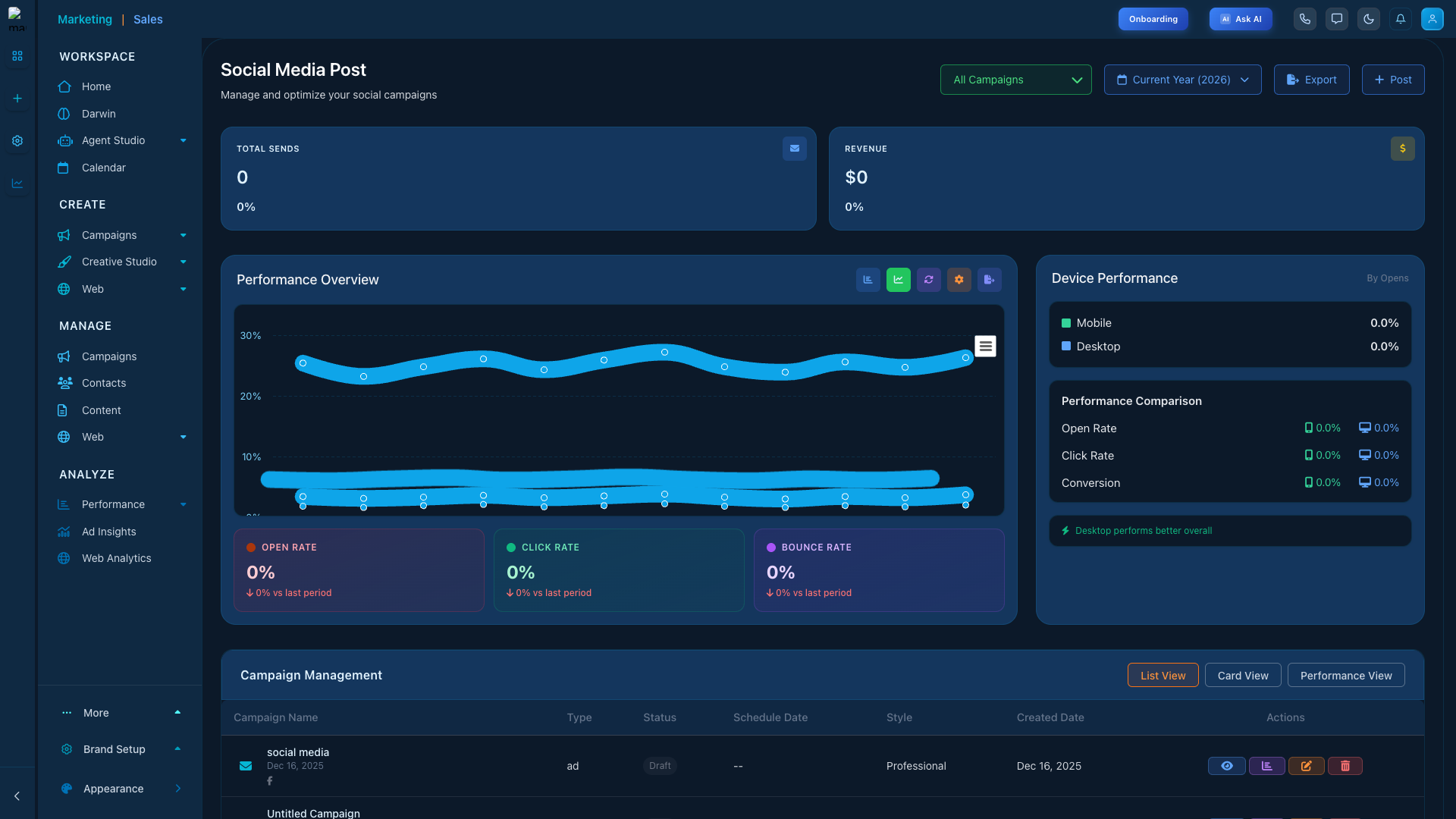
Campaign Hub
Creative Studio
Schedule and manage social posts
Calendar Month
📋 Overview
Create and schedule social media posts across multiple platforms from one unified dashboard.
🚀Quick Setup
Get started fast
🤖AI-Powered
Smart automation
📊Analytics
Track performance
🔗Integrations
Connect tools
Why Use This Feature?
Marketing Titan is designed to streamline your marketing operations and maximize efficiency. This feature is central to achieving those goals by providing a unified interface for managing complex marketing tasks. Whether you're a solo marketer or part of a large team, you'll find the tools you need to succeed.
The platform combines powerful automation with intuitive design, allowing you to accomplish more in less time. With built-in AI assistance, you can focus on strategy while the system handles routine tasks automatically.
Key Benefits
- Time Savings: Automate repetitive tasks and focus on high-value activities that drive results.
- Better Organization: Keep all your marketing assets and data in one centralized location.
- Improved Collaboration: Work seamlessly with team members through shared workspaces.
- Data-Driven Decisions: Access comprehensive analytics to inform your strategy.
- Scalability: Grow your marketing operations without increasing complexity.
🚀 Getting Started
⏱️ Quick Start Guide
Follow these steps to get up and running in minutes.
Step 1: Access the Feature
Navigate to /social-media-campaigns from the main sidebar or use quick search (Ctrl/Cmd + K).
Bookmark frequently used pages for quick access.
Step 2: Understand the Interface
The interface is divided into several key areas:
- Top Navigation: Quick actions, search, and notifications
- Left Sidebar: Primary navigation to all features
- Main Content: Your primary workspace
- Right Panel: Context-sensitive help and actions
Step 3: Configure Settings
Customize your experience through the settings panel:
🔔 Notifications
Email and in-app alerts
🎨 Display
Theme and layout options
⌨️ Shortcuts
Keyboard navigation
Step 4: Create Your First Item
Click the primary action button to start creating. The wizard guides you through each step. Don't worry about mistakes—everything can be edited later.
✨ Key Features
📊Dashboard & Analytics
Get a comprehensive overview of activities, metrics, and performance at a glance.
- Real-time metrics and KPIs
- Customizable widgets
- Historical trend analysis
- Export to CSV, PDF, or BI tools
AI-Powered Automation
Leverage AI to automate tasks and make smarter decisions.
- Smart content suggestions
- Automated scheduling
- Predictive analytics
- Intelligent segmentation
Customization Options
Tailor the interface to match your specific needs.
- Custom fields and properties
- Flexible workflow stages
- Personalized views
- Template creation
Team Collaboration
Work seamlessly with your team.
- Real-time editing
- Comments and mentions
- Role-based permissions
- Activity feeds
📖 Detailed Guide
Understanding the Dashboard
The main dashboard is your command center. It provides a bird's-eye view of all activities and surfaces the most important information. Key metrics update in real-time.
Below the metrics, you'll see recent activity and items requiring attention—pending approvals, upcoming deadlines, and team notifications.
Working with Data
All data syncs automatically across Marketing Titan. Changes in one area reflect immediately in related features. Use powerful search and filters to find exactly what you need.
⚠️ Important:Deleted items are retained in trash for 30 days before permanent deletion.
Automation Capabilities
Most repetitive tasks can be automated. Here's how:
- Identify Repetitive Tasks: Look for patterns in your daily work
- Create Rules: Use the "Automate" button to set up triggers
- Test: Run automation in test mode first
- Monitor: Check logs and adjust as needed
Collaboration Features
Marketing Titan is built for teamwork:
- Sharing: Share items with team members or external collaborators
- Commenting: Leave feedback using @mentions
- Version History: Track all changes and restore previous versions
- Assignments: Assign items with due dates and priorities
💡 Best Practices
✅ Do: Start Simple and Scale
Begin with basic workflows and add complexity as you become comfortable.
✅ Do: Use Templates
Create templates for common tasks to ensure consistency and save time.
✅ Do: Review Analytics
Set aside time weekly to review metrics and adjust strategy.
❌ Don't: Skip Setup
Proper initial configuration saves hours of frustration later.
❌ Don't: Ignore AI Suggestions
AI recommendations are based on data and proven best practices.
🔧 Troubleshooting
Page loading slowly- Clear browser cache
- Check internet connection
- Try different browser
- Disable extensions
- Check auto-save indicator
- Verify edit permissions
- Look for validation errors
- Try manual save (Ctrl/Cmd + S)
- Verify correct account
- Check with admin about permissions
- Some features require higher tier
- Try logging out and back in
❓ FAQ
How do I access this feature? Navigate to/social-media-campaigns from the sidebar or use quick search (Ctrl/Cmd + K).
Can I integrate with other features?
Yes! All Marketing Titan features work together. Use AI Flows for advanced automation.
Where can I get help?
Use Ada AI Assistant (click "Ask AI" in header) or visit the Help Center.
Is my data secure?
Yes. Marketing Titan uses enterprise-grade security including encryption in transit and strict per-tenant data isolation.
Can I export my data?
Yes. Export in CSV, JSON, or PDF formats using the export button in any list view.
🎓 Next Steps
Continue your learning journey:
🤖 AI Flows
Advanced automation
🧠 Darwin Agents
Autonomous AI workers
📊 Analytics
Performance tracking
📚 Templates
Quick content creation