
Accounts is your CRM board for the customers you do business with. Track each account’s health, its revenue (ARR), its churn risk, and its renewals — so you keep the customers you have and grow them.
Where to find it: Left menu → Sales → Pipeline → Accounts. It’s one of four connected boards — an account is the company (or person) your deals and contacts belong to.
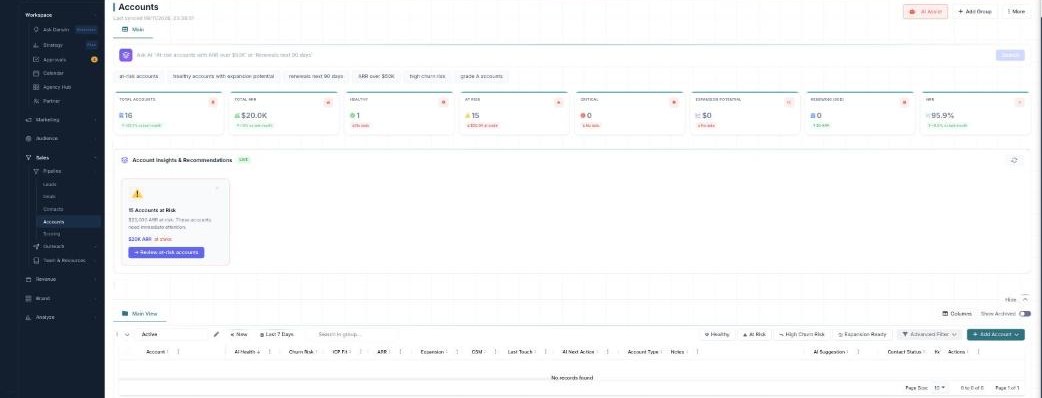
The Accounts board — customer health, revenue, and churn risk in one place.
Two kinds of account
Accounts come in two types — a Company Account for an organization, or an Individual Account for a single person. Choose the type when you click + Add Account.
The numbers up top
The stat cards summarize your customer base: Total Accounts, Total ARR, Healthy, At Risk, Critical, Expansion Potential, Renewing (90D), and NRR (net revenue retention) — each with how it’s trending.
Let the AI help
Three AI tools sit right on the board:
- Ask AI — type a plain-English question (“At-risk accounts with ARR over $50K”) and it filters for you.
- Account Insights & Recommendations — a LIVE panel flagging accounts at risk and the ARR at stake.
- AI Assist — opens a Follow-up Dashboard of exactly which accounts to reach out to.
See them all, plus AI Health and Churn Risk, in the AI guide.
Learn each part
| Topic | What it covers | Guide |
|---|---|---|
| The board & account types | Company vs individual accounts, columns, and bulk actions. | Open → |
| Groups & Advanced Filter | Organize accounts and build precise, saveable filters. | Open → |
| AI health, churn & follow-ups | Ask AI, AI Health / Churn / ICP Fit, and the follow-up dashboard. | Open → |
Built for keeping customers
Accounts is your customer-success view — AI Health, Churn Risk, ICP Fit, ARR, NRR, and renewals in one board. Scoring, insights, Ask AI, and AI follow-ups are part of your plan; only Enrich Data uses credits.
What’s next
- Explore the board & account types.
- Organize with groups & filters.
- Let AI watch health & churn.