
The Technical SEO tab is a health check on your website itself — how fast it loads, how well it’s optimized, and what’s worth fixing. It turns a technical audit into a short, prioritized list anyone can act on.
Where to find it: Brand Analysis → Technical SEO. Part of the Brand Analysis guide.
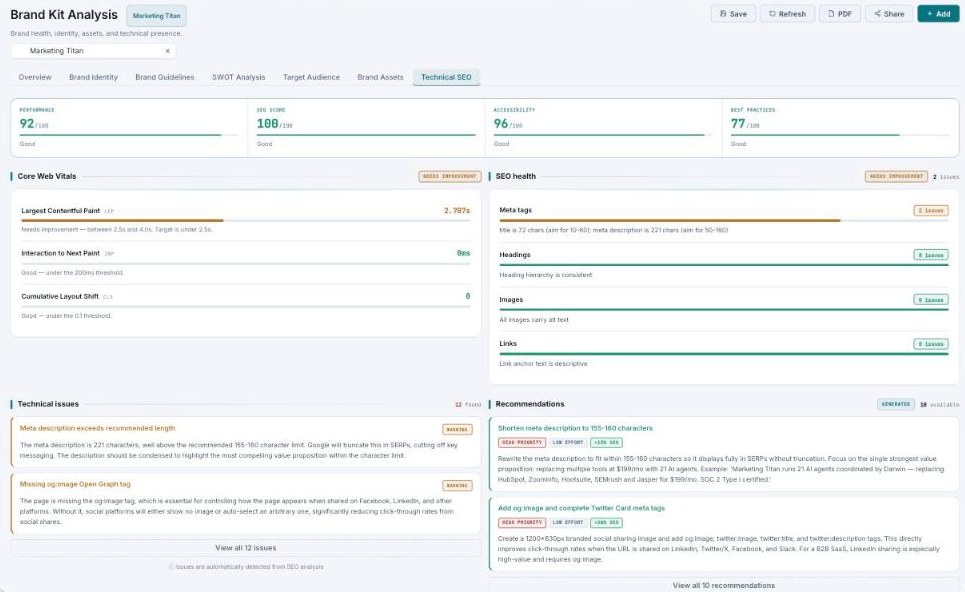
Technical SEO — four scores, Core Web Vitals, and a prioritized list of fixes.
The four scores
A row of scores (each out of 100, with a band label) summarizes your site’s technical health:
| Score | What it measures |
|---|---|
| Performance | How fast the page loads and responds. |
| SEO score | How well the page is optimized for search. |
| Accessibility | How usable it is for everyone. |
| Best practices | Modern web standards and security. |
Each is labeled Good (70+), Needs improvement (50–69), or Needs work (below 50).
Core Web Vitals
Google’s three speed-and-stability metrics, each with a value and a band: Largest Contentful Paint (LCP) — how fast the main content shows; Interaction to Next Paint (INP) — how quickly the page responds; and Cumulative Layout Shift (CLS) — how much the page jumps around while loading.
SEO health, issues & recommendations
- SEO health — per-area issue counts (Meta tags, Headings, Images, Links) with a short message each (e.g. “title is 72 chars — aim for 10–60”).
- Technical issues — each with a severity and a description of what’s wrong and why it matters.
- Recommendations — specific fixes, each tagged with priority, effort, and an estimated impact, plus a plain-English how-to.
Two trend charts — Performance trend and SEO progress — show whether things are getting better over time.
Fixes, ranked by payoff
Every recommendation shows priority, effort, and impact, so you can start with the high-impact, low-effort fixes and work down — no guessing which change is worth doing first.
Common questions
What’s a good score?
70 or above is Good; 50–69 needs improvement; below 50 needs work.
What are Core Web Vitals?
Google’s three measures of loading speed, responsiveness, and visual stability — they affect both user experience and search ranking.
What’s next
- Work the high-priority recommendations first.
- Re-run the audit with Refresh to track progress.
- Back to Brand Analysis.