
Brand Analysis (the Brand Kit Analysis) is Darwin’s full read on a brand — its health, identity, audience, assets, and technical presence, all scored and laid out across seven tabs. It turns “is our brand in good shape?” into a number you can act on, with the specific gaps called out and one-click ways to fix them.
Every tab is its own detailed view, so this page is the overview — open any tab below for the full walkthrough.
Where to find it: Left menu → Brand → pick a brand → Brand Analysis (opens the analyzer). A brand selector, and Save, Refresh, PDF, Share, and Add actions, sit across the top. Part of the Brands module.
The brand-health score
At the top of the Overview tab is your overall Brand Health Score out of 100, with a letter grade and a one-word position:
| Position | Score | What it means |
|---|---|---|
| Strong | 85–100 | Your brand is complete and consistent. |
| Moderate | 70–84 | Solid, with a few gaps worth closing. |
| Weak | Below 70 | Several areas need attention. |
The score is built from five sub-scores, each out of 100: Brand Reach, Engagement, Brand Impact, Digital Presence, and Brand Authority. The Overview tab shows all five as bars and a performance chart, so you can see exactly which one is dragging the total down.
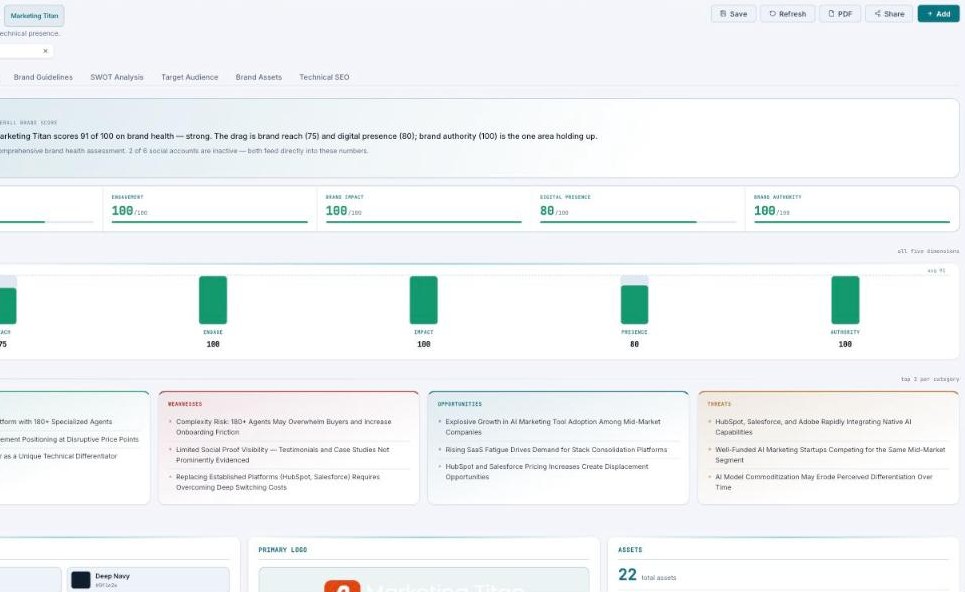
The Overview — your score out of 100, the five metrics behind it, and a plain-English read on what to fix.
The seven tabs — each has its own guide
| Tab | What it covers | Guide |
|---|---|---|
| Overview | The health score, five metrics, SWOT preview, and identity summary. | Open guide → |
| Brand Identity | Color palette, typography, and logo assets — with Approve controls. | Open guide → |
| Brand Guidelines | Brand voice, tone, usage guidelines, and restrictions. | Open guide → |
| SWOT Analysis | Strengths, Weaknesses, Opportunities, Threats, and strategic plays. | Open guide → |
| Target Audience | Demographics, personas, the customer journey, and behavior. | Open guide → |
| Brand Assets | Every image, product, service, and feature Darwin found. | Open guide → |
| Technical SEO | Performance, SEO, accessibility, Core Web Vitals, and fixes. | Open guide → |
How Darwin builds the analysis
Darwin crawls your site and connected accounts, then scores each dimension, drafts your identity and guidelines, builds a SWOT and audience picture, and runs a technical audit — so a full brand review that used to take an agency weeks lands in one screen. You review, edit, and Approve each section, and export it as a branded PDF whenever you need it.
Common questions
What’s a good score?
85 or above is Strong, 70–84 is Moderate, and below 70 is Weak. Each tab shows what’s pulling the number down.
How do I refresh the analysis?
Use Refresh in the top bar to re-run it, or the Analyze URL input to point it at a specific web address.
Can I export it for a client?
Yes — PDF exports the whole analysis, and the Brand Identity tab has separate Style Guide (PDF), Asset Package (ZIP), and Developer Kit (CSS) exports.
If a score looks low or a section is empty, run Refresh — and check the Brand Identity tab for a “crawl blocked” warning, which means your site blocked Darwin’s crawler and some data couldn’t be read.
What’s next
- Start with the Overview to read your score.
- Approve your Brand Identity and Guidelines.
- Fix what the Technical SEO tab flags.