
The SWOT Analysis tab is your brand’s strategic picture — a full Strengths, Weaknesses, Opportunities, and Threats breakdown, with each point prioritized and turned into a recommended play. It’s the “so what do we do about it” view.
Where to find it: Brand Analysis → SWOT Analysis. Part of the Brand Analysis guide.
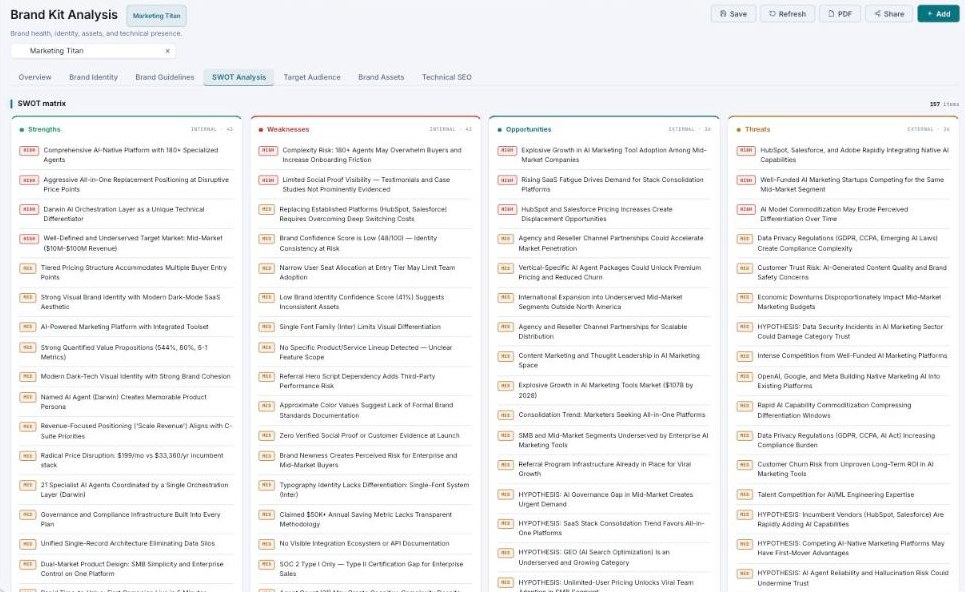
The SWOT matrix — internal Strengths/Weaknesses and external Opportunities/Threats, each with a priority.
The SWOT matrix
Four quadrants organize everything Darwin found, split by whether it’s internal (about you) or external (about your market):
| Quadrant | Internal / External | What it lists |
|---|---|---|
| Strengths | Internal | What your brand does well. |
| Weaknesses | Internal | Where you’re exposed or behind. |
| Opportunities | External | Openings in the market to pursue. |
| Threats | External | Risks and competitive pressure. |
Each item carries a priority (high / medium / low) so you can see what matters most at a glance, and you can + Add your own to any quadrant.
Strategic recommendations
Below the matrix, Darwin turns the SWOT into action with four classic strategy groups — matching your internal position to the external landscape:
- SO — use Strengths to seize Opportunities.
- WO — fix Weaknesses to unlock Opportunities.
- ST — use Strengths to defend against Threats.
- WT — shore up Weaknesses to survive Threats.
A SWOT you can actually use
Most SWOTs are a static grid. This one is prioritized and paired with named strategies, so it reads less like a report and more like a to-do list for your brand.
What’s next
- Ground the strategy in your Target Audience.
- Check the market-facing side in Technical SEO.
- Back to Brand Analysis.