
The Brand Guidelines tab is the words side of your brand — how it sounds and the rules for using it. Darwin drafts your mission, personality, tone, and do/don’t rules from what it learned about you, and you refine and approve them.
Where to find it: Brand Analysis → Brand Guidelines. Part of the Brand Analysis guide.
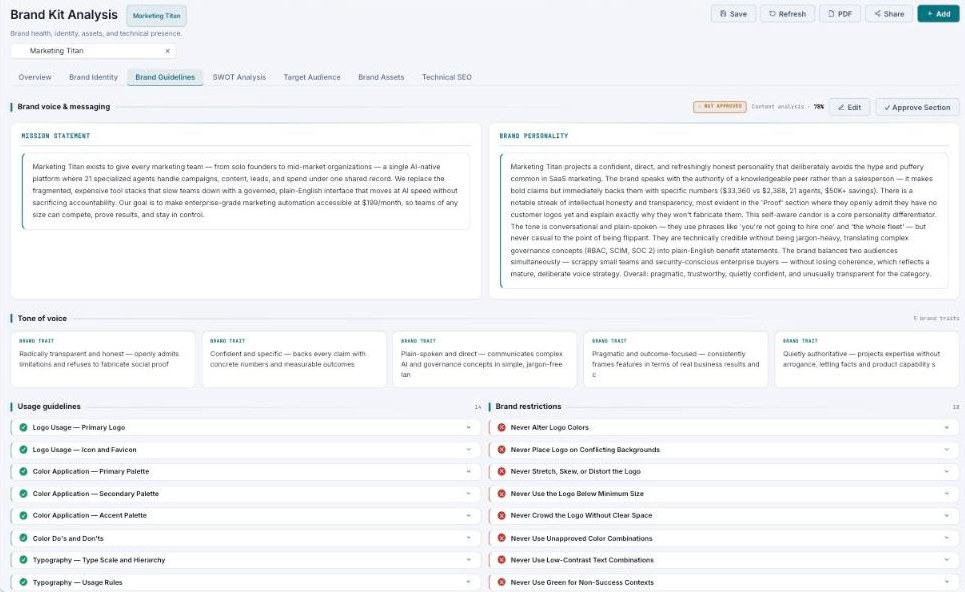
Brand Guidelines — mission, personality, tone traits, and do/don’t rules.
Brand voice & messaging
Two panels sit at the top: your Mission statement and your Brand personality — a paragraph describing how the brand speaks (confident, plain-spoken, and so on). Both are editable, carry a confidence score, and have an Approve Section button.
Tone of voice
Your brand traits appear as chips — short descriptions like “Radically transparent and honest” or “Confident and specific.” Add or remove traits to shape exactly how copy should read.
Usage guidelines & restrictions
Two lists spell out the rules, each an expandable item with a full description:
- Usage guidelines — the do’s: logo usage, color application, typography rules, and more. Add your own.
- Brand restrictions — the don’ts: “Never alter logo colors,” “Never stretch the logo,” “Never use low-contrast text.” Add your own.
This is what keeps AI copy on-brand
The voice, tone, and rules here are what Darwin follows when it writes anything for you — emails, ads, captions. The more precisely you set them, the more every generated piece sounds like you.
Common questions
Where does the mission come from?
Darwin drafts it from your site and brand data. Edit it to match exactly what you want, then approve.
What’s the difference between a guideline and a restriction?
A guideline is something to do; a restriction is something to never do. Both help keep your brand consistent.
What’s next
- Confirm the visuals in Brand Identity.
- See who you’re talking to in Target Audience.
- Back to Brand Analysis.