
The Logs tab is the raw Twilio event log — the technical trail behind every call and text. Each webhook Twilio sends (a call ringing, an SMS delivered, a message rejected) is recorded here. It’s the place to go when you need to understand exactly why something happened.
Where to find it: Left menu → Sales → Outreach → Calling → Logs. Part of the Calling guide.
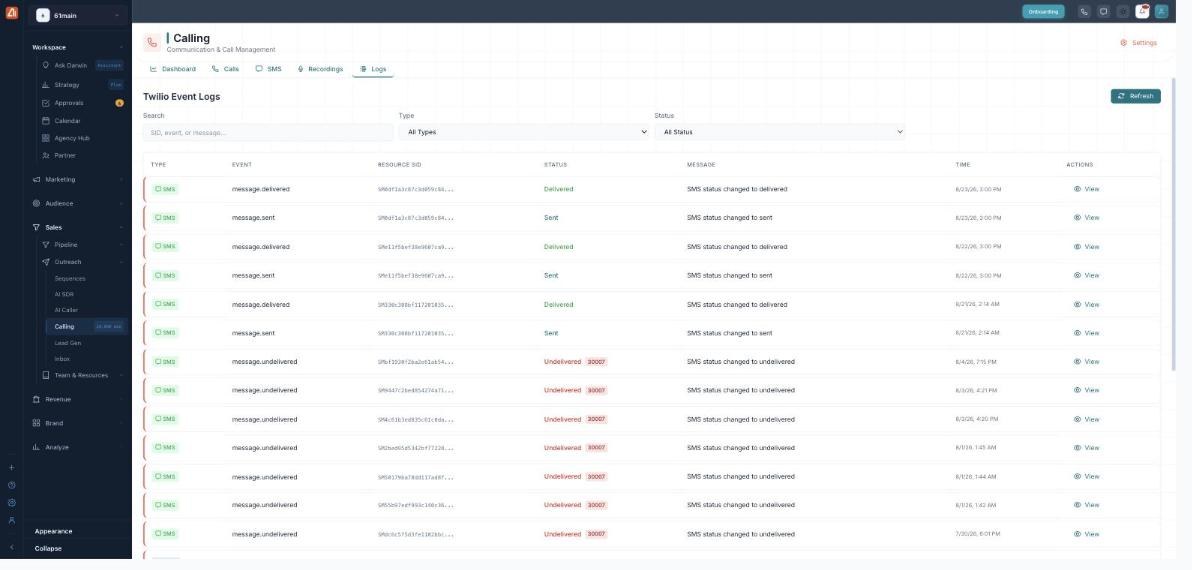
The raw Twilio event trail for calls and messages — useful for troubleshooting.
How to use it
- Open Calling → Logs.
- Filter by Type (Call, SMS, Webhook, Recording, Error) and Status.
- Turn on Errors Only to jump straight to problems.
- Search by SID, event, or message, then click View for the full event.
Events you’ll see
| Event | Meaning |
|---|---|
| call.initiated → ringing → in-progress → completed | The lifecycle of a call, step by step. |
| dial.answered | The dialed party answered. |
| call.no-answer | The call rang out. |
| message.sent → delivered | A text was handed off and then confirmed delivered. |
| message.undelivered | A text the carrier refused — look at the error code. |
Reading a row
Each row shows the Type, the Event name, the Twilio Resource SID (the unique id for that call or message), the Status, a short Message, and the Time. An error code next to a status (for example 30007, a message filtered by the carrier) points to the exact reason.
💡 Tip: Chasing a specific call or text? Copy its SID from the Calls or SMS tab and paste it into the Logs search to see its whole event history.
FAQ
What is a Resource SID?
Twilio’s unique id for a call (starts with CA) or a message (starts with SM). It ties every event for that item together.
What does error 30007 mean?
The carrier filtered the message (commonly flagged as spam or blocked). It’s the most frequent reason a text shows Undelivered.
Do I need to use this tab day-to-day?
No — it’s for troubleshooting. For everyday review use Calls, SMS and the Dashboard.