
Calling is your communication hub, powered by Twilio. It brings every phone call and text message on your account into one place — the calls your AI Caller places, texts your sequences send, and anything dialed by hand — with analytics, full history and a technical event log. It’s where you go to see what happened on the wire.
Where to find it: Left menu → Sales → Outreach → Calling. Part of the Calling guide.
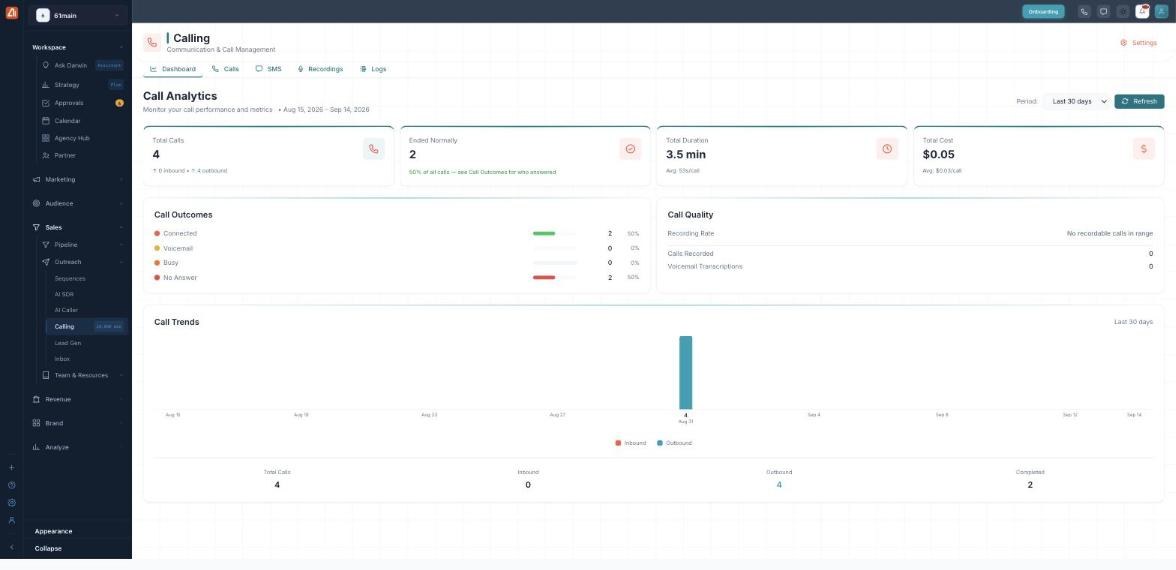
The dashboard is your at-a-glance view of call performance and cost.
The five tabs
| Tab | What it’s for |
|---|---|
| Dashboard | Call analytics — volume, outcomes, quality and cost (this page). |
| Calls | Every call with its status, duration and time. |
| SMS | Every text message, plus Send Bulk SMS. |
| Recordings | Recorded calls and their transcriptions. |
| Logs | The raw Twilio event log for troubleshooting. |
Reading Call Analytics
Pick a window with the Period selector (Last 7 / 30 / 60 / 90 days) and hit Refresh to update. The four cards summarize it:
| Metric | What it means |
|---|---|
| Total Calls | Every call in the period, split into inbound and outbound. |
| Ended Normally | Calls that finished cleanly, and what share of all calls that is. |
| Total Duration | Combined talk time, with the average per call. |
| Total Cost | What the calls cost, with the average per call. |
Below the cards:
- Call Outcomes — how calls ended: Connected, Voicemail, Busy, No Answer (count and %).
- Call Quality — your Recording Rate, Calls Recorded and Voicemail Transcriptions.
- Call Trends — a chart of inbound vs outbound calls over time.
How to check your call performance
- Open Calling → Dashboard.
- Set the Period (Last 7 / 30 / 60 / 90 days) and click Refresh.
- Read the four cards for volume, success, talk time and cost.
- Scan Call Outcomes to see how calls ended, and Call Trends for the pattern over time.
- Jump into the Calls or SMS tab for the individual records behind the numbers.
💡 Good to know: The Calling hub is a view of all your telephony activity. To run automated AI calling campaigns, use AI Caller — those calls still show up here.
FAQ
Is this the same as AI Caller?
No. AI Caller places automated AI calls; the Calling hub is where you review all call and SMS activity — including AI Caller’s — with analytics and logs.
Where do these calls and texts come from?
From everything on your Twilio number: AI Caller campaigns, sequence SMS, and manual calls or texts.
How is cost calculated?
It’s the Twilio usage cost for the calls in the selected period, shown as a total and an average per call.
What does “Ended Normally” mean?
The call completed cleanly (rather than failing, being canceled, or getting no answer). See Call History for the per-call status.