
The Templates tab is a library of ready-made designs so you never start from a blank page. Browse them, use one as a starting point, or have Darwin generate one.
Where to find it: Left menu → Marketing → Content → Library → Templates (the page is titled Content). Part of the Content guide.
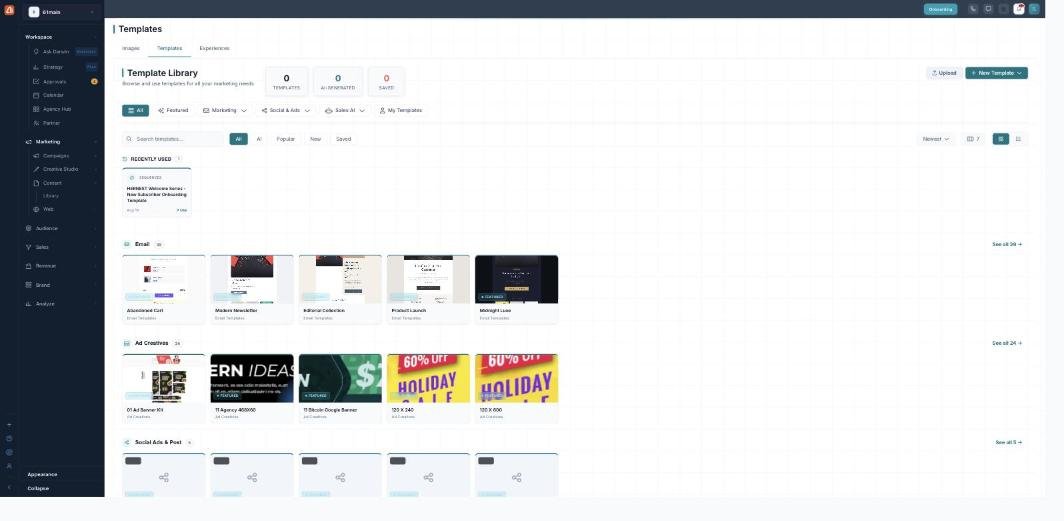
The Template Library — a head start for every kind of marketing.
Browsing
Templates are grouped by what they’re for — Email, Ad Creatives, and Social & Post — with a Recently used row up top. Narrow the list with the category chips (Featured, Marketing, Social & Ads, Sales AI, My Templates) or search by name, and adjust the columns or switch to a list. The counters at the top track how many templates, AI-generated ones, and saved ones you have.
Using a template
Open a template to use it as a starting point — it opens in the matching builder (email, ad, or social) where you fill it with your own copy and brand. Save a template you like so it’s quick to reuse.
Your own & AI-made
Bring your own design in with Upload, start fresh with New Template, or let Darwin build one for you — the AI-generated filter shows those.
What’s next
- Back to Content & the asset library.
- See Adding assets.
- See Editing & enhancing images.
- See Experiences.