
The Brand Assets tab is the inventory of everything Darwin found for your brand — the images, products, services, and features it can pull into your marketing. It’s where you see what you have to work with and fill the gaps.
Where to find it: Brand Analysis → Brand Assets. Part of the Brand Analysis guide.
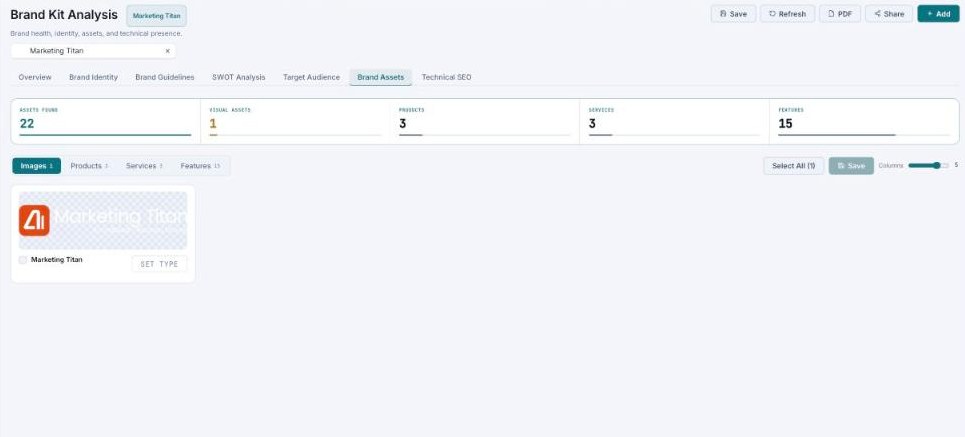
Brand Assets — a count of everything found, with filter tabs and an asset grid below.
The summary counts
A row of counts up top tells you what Darwin cataloged:
| Count | What it is |
|---|---|
| Assets found | The total across every type. |
| Visual assets | Images and graphics. |
| Products | Products detected on your site. |
| Services | Services you offer. |
| Features | Product or service features. |
A count is clickable when it has items behind it, so you can jump straight to that group.
Browse & organize
Filter tabs let you switch between Images, Products, Services, and Features. Each asset appears as a card with a thumbnail, name, an image-type picker, a description, and tags. Use Select all, the columns slider to change the grid density, and Save to keep your changes.
Mind the coverage gap
If your brand is light on visual assets, Darwin shows an image coverage gap callout — a nudge to add more images so your generated creatives have real photography to draw from instead of stock.
Common questions
Where do these assets come from?
Darwin gathers them from your website and connected sources during the analysis. Add more in your Brand Assets libraries.
What’s the image type for?
Tagging an image’s type helps Darwin place it correctly when it composes ads and posts.
What’s next
- Add more media in the Brand Assets libraries.
- Confirm your visuals in Brand Identity.
- Back to Brand Analysis.