
Ad Designer builds polished ad creative on a layered canvas — the kind of ad you’d put money behind. Answer a few guided questions and Darwin generates on-brand variants sized for every placement, or open the canvas and design layer by layer. It’s made for ads specifically, so the output is focused: one clear message, room for your copy, and every size a campaign needs.
You can build a single creative, generate a whole bulk pack across products and personas, start from a template, or start blank. Everything stays on-brand, and finished ads are grouped so you can find and reuse them.
Where to find it: Left menu → Marketing → Creative Studio → Media → Generate tab → Ad Designer (Pro).
Four ways to start
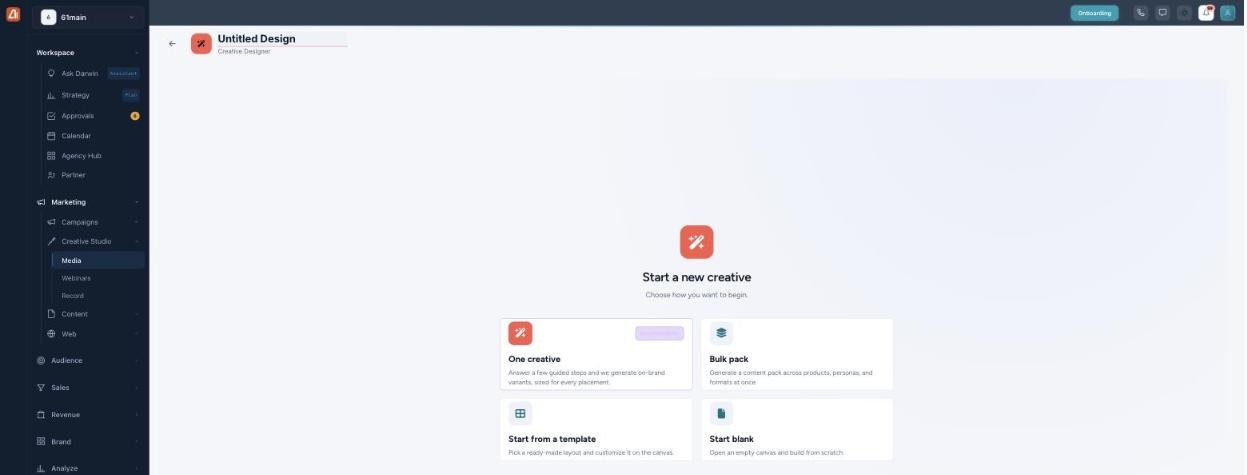
Ad Designer — one creative, a bulk pack, a template, or a blank canvas.
| Option | When to use it |
|---|---|
| One creative | Answer a few guided steps and Darwin generates on-brand variants, sized for every placement. |
| Bulk pack | Generate a content pack across products, personas, and formats all at once. |
| Start from a template | Pick a ready-made layout and customize it on the canvas. |
| Start blank | Open an empty canvas and build from scratch. |
The guided ad builder
The guided flow is a short wizard with a live preview beside it. It has two modes across the top — One ad (a single creative) and Multiple ads (a pack). Step 1 asks which brand the ad is for, and what you’re advertising: a Product, Service, Event, Offer, or the Brand itself. Pick from your saved items or describe it, then choose a persona (or let AI pick).
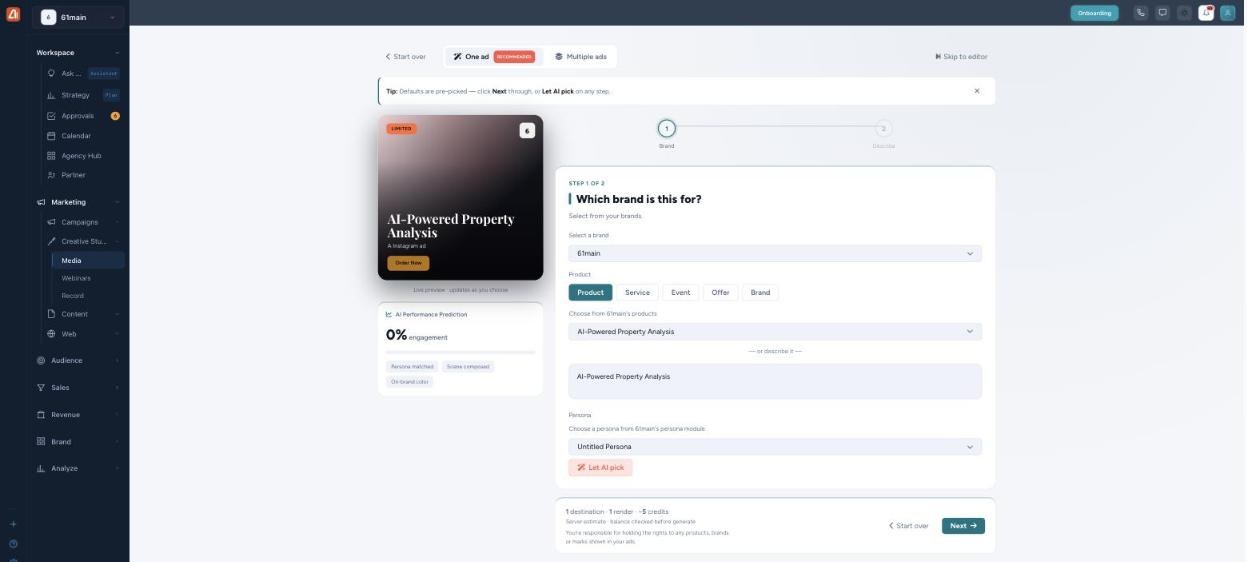
The ad wizard — brand, what you’re advertising, and persona, previewed live.
From there the wizard walks you through the rest — the audience and goal, the formats, and the creative direction — then generates the ad (or the whole pack) on-brand and ready to launch. You can jump straight to the canvas editor at any point with Skip to editor.
How Darwin designs the ad
Ad Designer starts from your brand and the exact thing you’re advertising, then composes a layered creative with one clear focal point and space for your message — sized for every placement you choose. Because it’s a layered canvas, you keep full control: adjust any layer, or let Darwin generate variants and pick the strongest.
Usage & credits
Generating ads uses credits, and the estimate is shown before you generate — for a single ad you’ll see something like “1 destination · 1 render ≈ 5 credits,” with a note that the balance is checked before generating. Your balance is in the top-right of Creative Studio.
- One creative is the cheapest path — a single render for a single placement.
- Bulk packs cost more because they render many ads at once (every product × persona × format combination). Great value per ad, but the total is larger — the estimate shows the render count.
- More formats/placements = more renders = more credits.
- The balance is checked before generate, so a run never starts if you’re short.
- You’re responsible for holding the rights to any products, brands, or marks shown in your ads.
Testing a concept? Generate One creative first to lock the look and message, then switch to a Bulk pack to roll it out across every product and size in one run.
Common questions
What’s the difference between One creative and Bulk pack?
One creative makes a single ad. Bulk pack generates a whole set across products, personas, and formats in one run — grouped together as a pack.
Where do bulk ads go?
Into Saved Ad Packs (a tab in Creative Studio), where you open a pack to view and edit its variations.
Can I edit the design by hand?
Yes — it’s a layered canvas. Use Skip to editor or Start blank / Start from a template to work directly on the layers.
What can I advertise?
A Product, Service, Event, Offer, or the Brand itself — pick from your saved items or describe it.
How much will a bulk pack cost?
The estimate shows the number of renders (products × personas × formats). More combinations means more credits — it’s all shown before you generate.
Having trouble? If Generate won’t run, check your credit balance. If ads look off-brand, confirm the correct brand is selected on step 1. If a bulk pack is larger than expected, reduce the number of products, personas, or formats.
What’s next
- Start One creative and pick the brand and offer.
- Roll a winning concept out with a Bulk pack.
- Open your packs in Saved Ad Packs to edit variations.