
Review & Activate opens the launch dock. Pick how much Darwin does for you, confirm the trigger, senders and compliance, then activate.
Where to find it: Left menu → Sales → Outreach → Sequences → Review & Activate. Part of the Sequences guide.
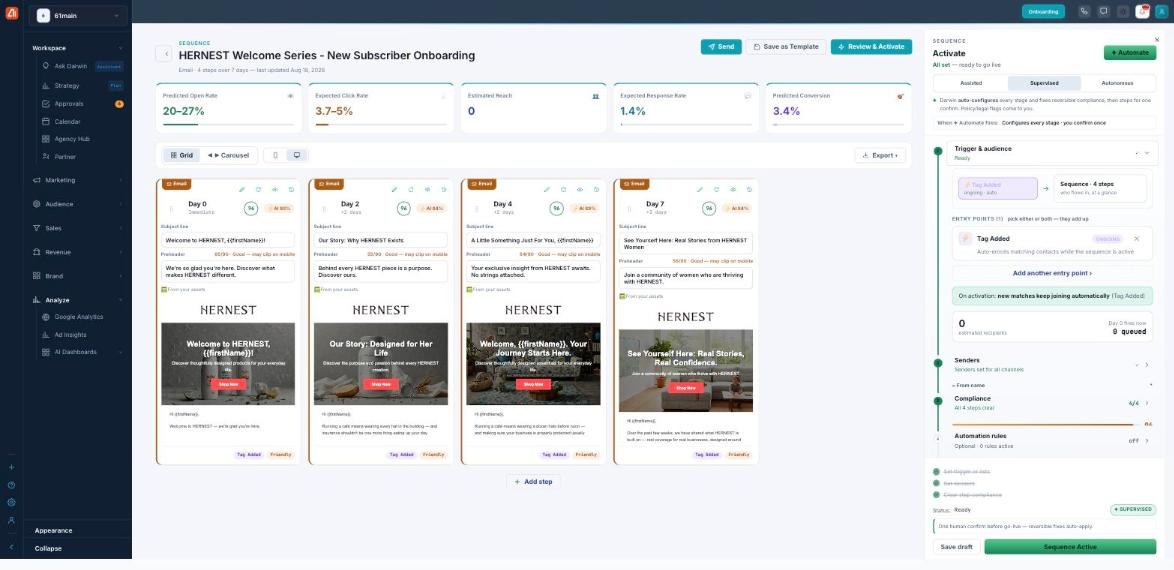
Choose how hands-on Darwin is, clear the checks, and go live.
How hands-on is Darwin?
Choose an autonomy mode:
- Assisted — Darwin proposes each stage and you accept; nothing is applied or activated for you.
- Supervised (default) — Darwin auto-configures every stage and fixes reversible compliance, then stops for one confirm. Policy or legal flags still come to you.
- Autonomous — Darwin configures, fixes, and activates — still routing for approval where required and always confirming spend or legal.
Automate runs the configuration in one go (“configures every stage · you confirm once”).
Trigger & audience
Set the entry point(s) — the event that enrolls contacts (for example Tag Added, which auto-enrolls matching contacts while the sequence is active). Add another entry point to combine them. The dock shows estimated recipients and how many are queued to fire on Day 0.
Senders & compliance
Senders sets the from-name and account for each channel. Compliance checks every step — it reads All N steps clear when the sequence is ready to send.
Automation rules & test
Automation rules are optional IF/THEN rules (off by default) — tick Enable IF/THEN automation rules to branch the flow. Test sends a test across all channels so you can check the real thing first.
Go live
Save draft keeps it as a draft. The activate button confirms and launches — in Supervised it reads Confirm & Activate, and once running it shows Sequence Active. Remember: activating and running the sequence is what sends messages, and sends are what use credits.
What’s next
- Back to the Sequences overview.
- See Three ways to build.
- See Describe your goal (Express).
- See Steps, channels & preview.
- See Editing & regenerating steps.