
In Express you describe the goal and AI does the rest — it picks the channels and cadence and writes every message. It’s a single screen with a live preview.
Where to find it: Left menu → Sales → Outreach → Sequences → Describe your goal. Part of the Sequences guide.
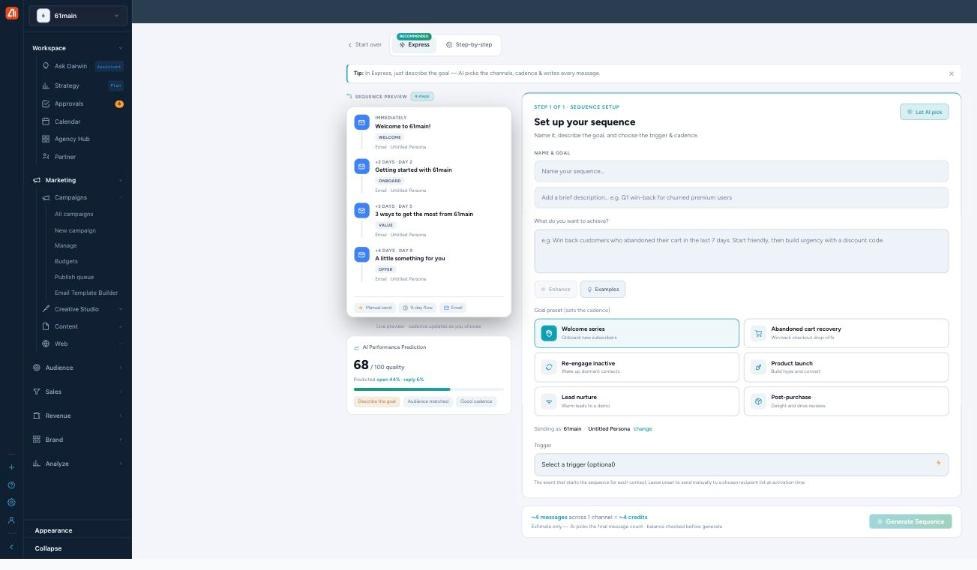
Describe the goal, pick a preset, and Generate — the whole sequence writes itself.
Name & goal
Give the sequence a name and an optional short description, then fill in What do you want to achieve? — plain English, e.g. “Win back customers who abandoned their cart in the last 7 days.” Enhance sharpens what you wrote, Examples drops in a sample, and Let AI pick fills the whole setup for you.
Goal preset (sets the cadence)
Pick a preset to set the timing and steps: Welcome series, Abandoned cart recovery, Re-engage inactive, Product launch, Lead nurture, or Post-purchase. Each comes with its own cadence — for example Welcome series is Day 0 / Day 2 / Day 5 / Day 9, and Lead nurture even mixes in a LinkedIn step.
Sending as, and the trigger
Sending as shows the brand and persona the messages come from (use change to switch). The Trigger is the event that starts the sequence for each contact — leave it as Select a trigger (optional) to send manually to a list at activation time instead.
The live preview & quality score
On the left, Sequence Preview updates as you choose — each step’s timing (IMMEDIATELY, +2 days…), role (Welcome / Onboard / Value / Offer), and channel. The AI Performance Prediction card gives an at-a-glance quality score out of 100 with predicted open and reply rates, and chips telling you what would strengthen it (add a persona, more detail, a second channel).
Generate
The footer estimates ~N messages across N channels. Click Generate Sequence and AI writes the full draft, then opens it in the preview. Generating is free — see below.
What costs credits
Building is free. Generating a sequence, regenerating a step, and AI Rewrite / Improve / Enhance / Let AI pick use no credits. You only spend credits when messages actually send (one credit per email beyond your plan’s included sends). AI Call steps draw on a separate call-minutes pool. The “~N credits” shown while you set up is an estimate of the send, not a charge for generating.
What’s next
- Back to the Sequences overview.
- See Three ways to build.
- See Steps, channels & preview.
- See Editing & regenerating steps.
- See Review & Activate.