
The Compliance tab keeps your calling within the rules. AI Caller checks every number against your Do-Not-Call (DNC) list before it dials, records consent, and keeps an audit trail you can show if you’re ever asked.
Where to find it: Left menu → Sales → Outreach → AI Caller → Compliance. Part of the AI Caller guide.
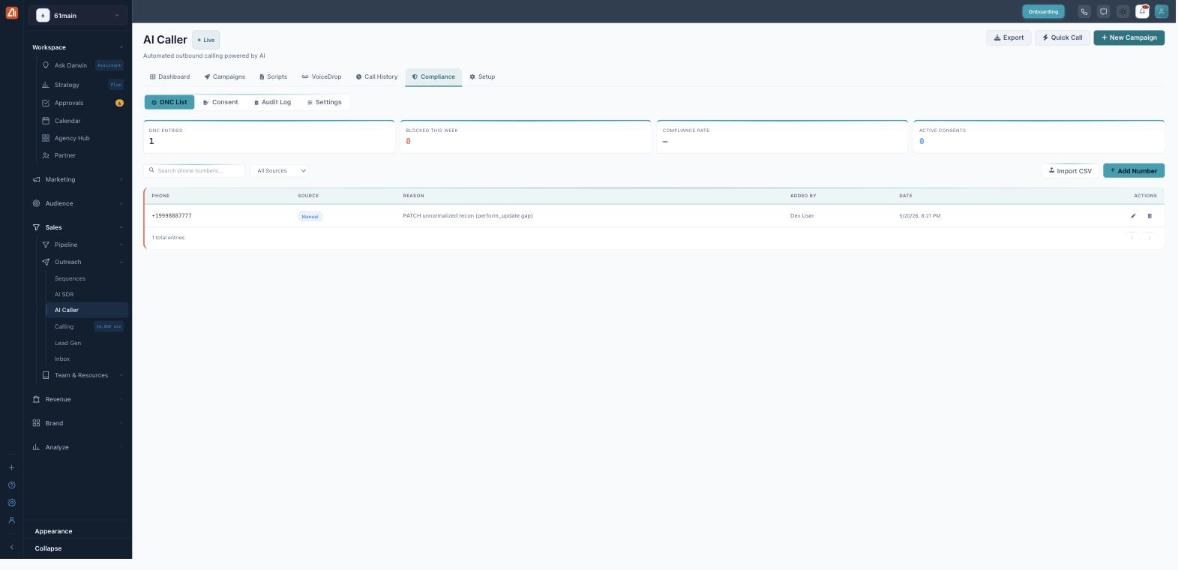
Manage your Do-Not-Call list, consent and audit trail here.
How to add a number to the DNC list
- Open AI Caller → Compliance → DNC List.
- Click Add Number.
- Enter the phone number and an optional reason.
- Save — AI Caller will never call that number again.
How to import a DNC list
- Click Import CSV on the DNC List sub-tab.
- Upload a CSV of numbers to suppress.
- They’re added in bulk and screened on every future call.
The four sub-tabs
| Sub-tab | What’s there |
|---|---|
| DNC List | Numbers AI Caller will never call. Filter by source, add one number or import a CSV. Each entry records its source, reason, who added it and when. |
| Consent | The record of who agreed to be contacted. |
| Audit Log | A time-stamped trail of compliance events. |
| Settings | Your compliance rules and calling-hour limits. |
Where DNC numbers come from
The Source filter shows how each number got onto the list: National DNC (the official registry), Internal (added by your account’s rules), Manual (added by hand) or CSV Import (bulk upload).
The metric cards
| Card | What it means |
|---|---|
| DNC Entries | How many numbers are suppressed. |
| Blocked This Week | Calls stopped by the list in the last 7 days. |
| Compliance Rate | Your clean-call percentage. |
| Active Consents | Contacts who have opted in. |
💡 Important: This is a tool to help you stay compliant — it is not legal advice. You remain responsible for following the TCPA and any state or local calling rules that apply to you.
FAQ
What happens if a number is on the DNC list?
AI Caller will not call it. The attempt is blocked and logged with a DNC outcome in Call History.
Does it check before every call?
Yes — every number is screened against the DNC list before the call is placed.
What is a consent record?
Proof that a contact agreed to be called. Keeping consent records is part of staying compliant.