
AI Caller makes automated outbound phone calls with a natural, human-sounding AI voice. It dials your contacts, follows a script you approve, holds a real two-way conversation, qualifies the prospect, and books a meeting or hands the call to a human — or it can drop a ringless voicemail instead of calling. Every call is logged, scored for sentiment, and screened against your Do-Not-Call list first.
Where to find it: Left menu → Sales → Outreach → AI Caller. Part of the AI Caller guide.
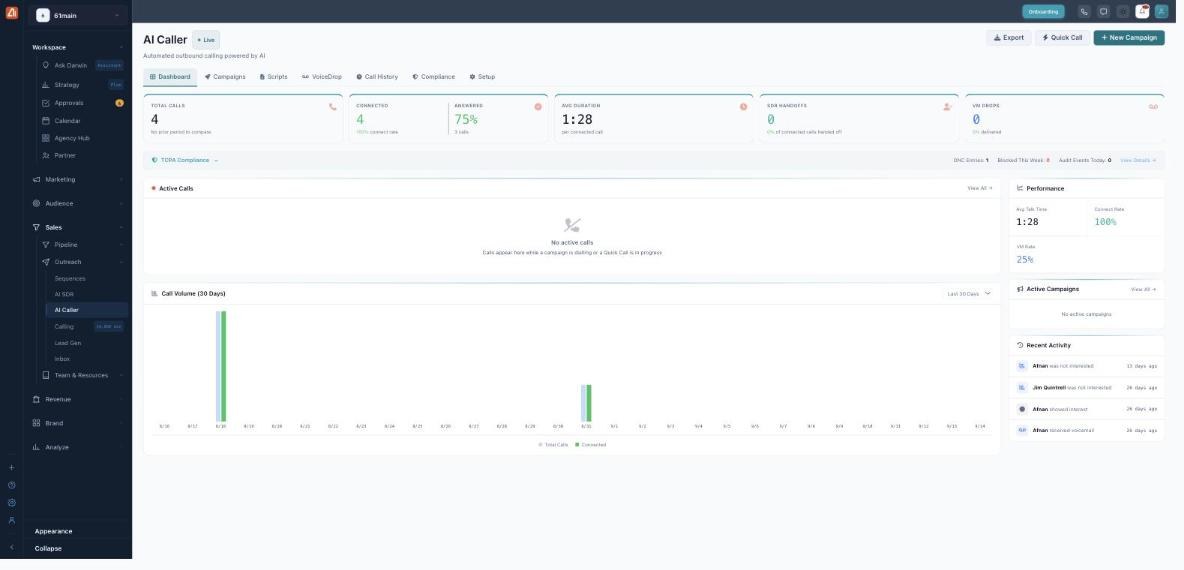
The dashboard is your at-a-glance view of calling activity and account health.
What you can do with AI Caller
- Run outbound calling campaigns — upload a list and let the AI work through it on a schedule you set.
- Book meetings automatically — the AI qualifies the prospect and offers times, or transfers a hot lead to a human.
- Drop ringless voicemails — deliver a recorded message without ringing the phone.
- Answer inbound calls — an AI receptionist can take calls that come back in.
- Stay compliant — automatic DNC screening, consent records, and a full audit log.
The seven tabs
| Tab | What it’s for |
|---|---|
| Dashboard | Live metrics, active calls and recent activity (this page). |
| Campaigns | Build and run calling campaigns from a contact list. |
| Scripts | What the AI says: opening, value, objections and close. |
| VoiceDrop | Ringless voicemail drops and their delivery tracking. |
| Call History | Every call with its outcome, duration and sentiment. |
| Compliance | Do-Not-Call list, consent records and audit log. |
| Setup | The one-time wizard that configures your voice and script. |
Reading the dashboard
The strip across the top summarizes the selected period:
| Metric | What it means |
|---|---|
| Total Calls | Every call placed in the period. |
| Connected | Calls that reached a live person, with the connect rate. |
| Answered | Share of calls that were picked up. |
| Avg Duration | Average length of a connected call. |
| SDR Handoffs | Calls the AI transferred to a human. |
| VM Drops | Ringless voicemails delivered. |
Below the strip: the TCPA Compliance bar shows DNC entries, numbers blocked this week and audit events (click View Details to open Compliance); Active Calls lists anything dialing right now; the Call Volume chart plots the last 7, 14, 30 or 90 days; and the Performance, Active Campaigns and Recent Activity cards fill in the detail.
Get started in four steps
- Run Setup to choose a voice and a starter script.
- Make sure a Caller ID (phone number) is provisioned so calls have a number to come from.
- Create a campaign, attach a script, and import your contacts.
- Press Play on the campaign and watch calls appear live on the dashboard.
💡 Tip: Use the top-right Quick Call to test the experience on your own phone before you launch a full campaign.
FAQ
Do I need my own phone number?
No — a Caller ID is provisioned for you. You can review or add numbers in Setup and on the VoiceDrop → Caller IDs tab.
What’s the difference between a call and a VoiceDrop?
A call is a live AI conversation. A VoiceDrop is a pre-recorded message delivered straight to voicemail without ringing — lighter touch, no conversation.
Can the AI book meetings on its own?
Yes. When a prospect qualifies, the AI can offer times and book the meeting, or transfer the call to a human (an SDR handoff).
Is it compliant?
AI Caller screens every number against your Do-Not-Call list before dialing and keeps a consent record and audit log. See the Compliance guide. It helps you stay compliant but is not legal advice.