
Typography holds your brand’s type hierarchy so everything you produce reads consistently.
Where to find it: Left menu → Brand → a brand → Typography. Part of the Brand Guidelines guide.
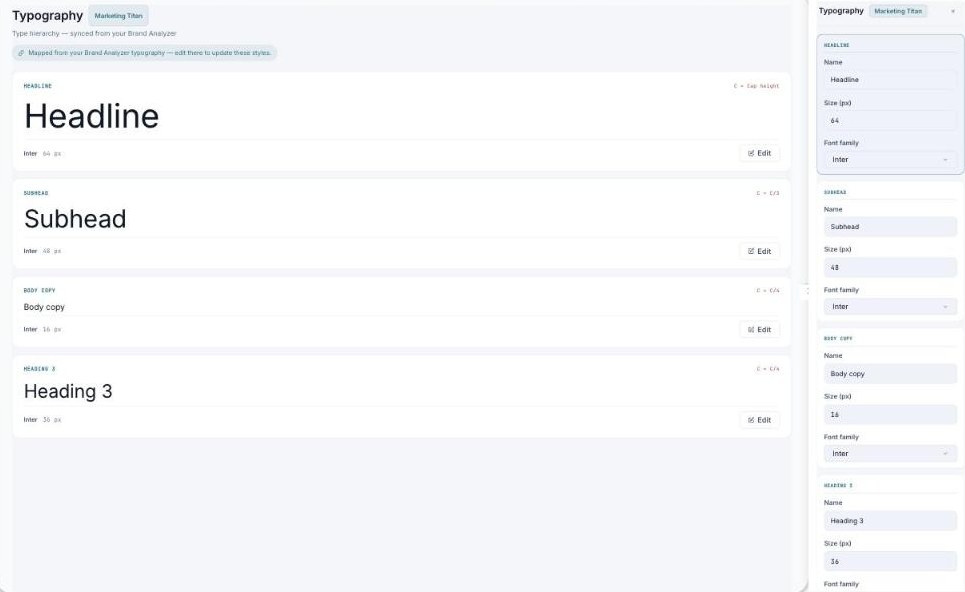
Your type hierarchy — Headline, Subhead, Body, and headings, each with its font, size, and weight.
The type hierarchy
Each named style — Headline, Subhead, Body copy, Heading 3 — shows its font family, size, and weight, with a live preview of the text at that style.
Editing
Click Edit on a style to open a panel showing its Font family, Size, and Role. The type hierarchy is synced from your Brand Analyzer — so if a style looks wrong, update it in the analyzer and it flows through here.
What’s next
- Back to the Brand Guidelines guide.
- See Colors.
- See Icons.
- See Brand Voice.