
Chat is a conversational assistant for your inbox. Ask it in plain English to draft a reply, create a rule, change how it writes, or analyze a conversation — no menus needed.
Where to find it: Left menu → Sales → Outreach → Inbox → AI Assistant → the Chat tab. Part of the AI Assistant & Rules guide.
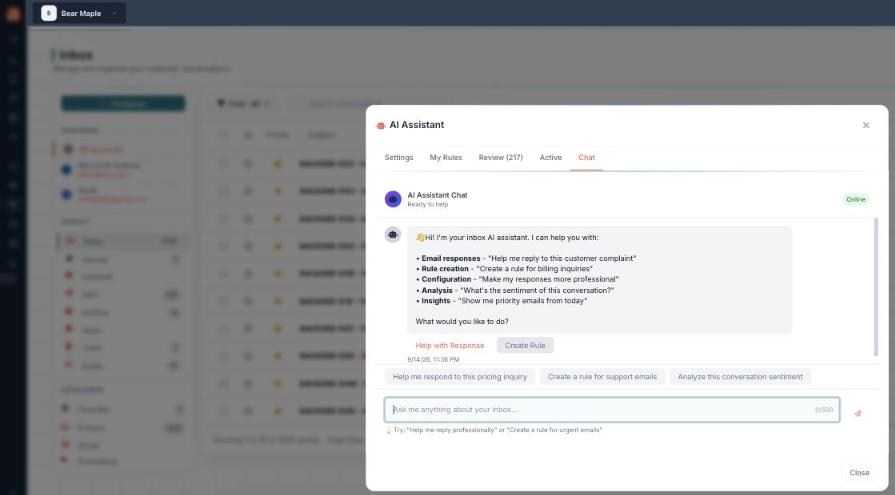
Ask the assistant in plain English — drafts, rules, analysis and insights.
What you can ask
| Ask for… | Example |
|---|---|
| Email responses | “Help me reply to this customer complaint.” |
| Rule creation | “Create a rule for billing inquiries.” |
| Configuration | “Make my responses more professional.” |
| Analysis | “What’s the sentiment of this conversation?” |
| Insights | “Show me priority emails from today.” |
How to use it
- Open AI Assistant → Chat.
- Type your request in Ask me anything about your inbox…, or tap a quick-prompt chip.
- Use Create Rule to turn a request into a saved rule, or Help with Response to draft a reply.
💡 Tip: Chat is the fastest way to build a rule — describe it in a sentence and the AI adds it to My Rules for you.
FAQ
Is it different from the CRM’s Ask Darwin?
This chat is focused on your inbox — replies, rules and email insights — rather than the whole platform.
Can it actually create rules?
Yes — ask it to, or use the Create Rule button, and the rule appears under My Rules.
Does it send emails directly?
It drafts; sending still follows your Require Approval setting.