
The Inbox is your unified inbox. Connect your email accounts — Gmail, Outlook and more — and every conversation lands in Marketing Titan, right next to your CRM. Your whole team can read, assign, tag and reply from one shared place, so nothing slips through the cracks.
Where to find it: Left menu → Sales → Outreach → Inbox. Part of the Inbox guide.
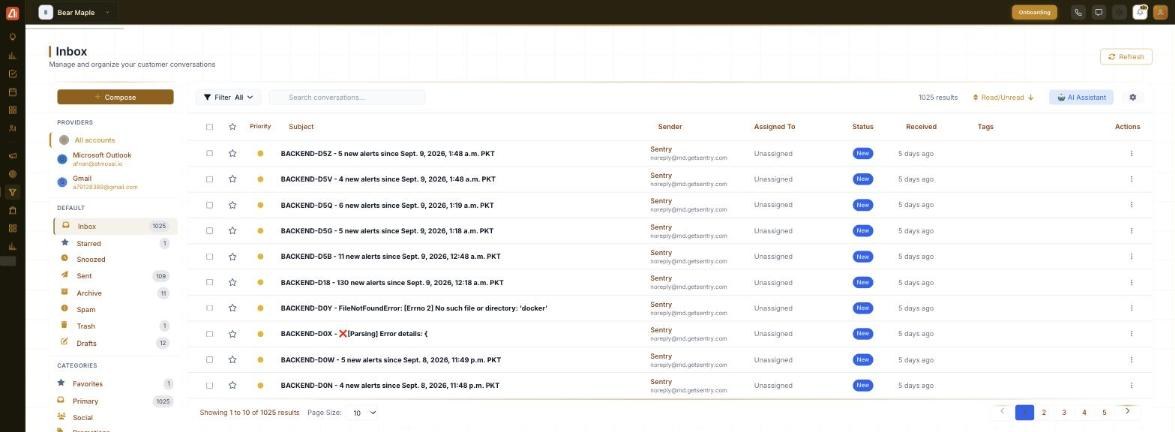
The unified inbox — folders and categories on the left, conversations on the right.
What you can do with the Inbox
- Bring every mailbox together — read all your connected accounts in one list.
- Work as a team — assign a conversation to a teammate, set its status, and add tags.
- Stay organized — folders (Starred, Snoozed, Archive…) and categories keep the list tidy.
- Reply in place — compose, reply and forward without leaving Marketing Titan.
- Get an AI hand — the AI Assistant helps triage, draft replies and run rules.
Connect an email account
When the Providers section reads “No email providers connected”, the inbox is empty because there’s nothing to pull from yet. Connect an account to fill it:
- In the left sidebar, under Providers, choose to connect an account (or open Accounts).
- Pick your provider (for example Gmail or Outlook).
- Sign in and authorize Marketing Titan to access that mailbox.
- Your conversations sync in and appear in the list — click Refresh if you want to pull the latest right away.
💡 Good to know: Connecting is secure and read/write — you can reply from the connected address, and replies thread back into the same conversation.
Find your way around
| Area | What it’s for |
|---|---|
| Sidebar folders | Inbox, Starred, Snoozed, Sent, Archive, Spam, Trash and Drafts. |
| Categories | Favorites, Primary, Social and Promotions group your mail. |
| Compose | Start a new email — see Composing & Replying. |
| Filter / Search / Sort | Narrow the list, search text, and order by date. |
| AI Assistant | AI help for triaging, drafting and rules. |
| Conversation table | Every conversation — see Managing Conversations. |
FAQ
Which providers can I connect?
Common email providers such as Gmail and Outlook. Open the Providers section in the sidebar to connect one.
Why is my inbox empty?
Because no email account is connected yet (Providers shows “No email providers connected”). Connect one and your conversations sync in.
Can my whole team use it?
Yes — it’s a shared inbox. Conversations can be assigned to teammates and given a status so everyone knows who’s on what.
Can I reply from here?
Yes — compose, reply and forward directly, and the messages send from your connected address.