
As you add rules, a live Total Score updates and sorts records into Hot, Warm, and Cold. Test it, save it, and it starts scoring your board automatically.
Where to find it: Left menu → Sales → Pipeline → Scoring → Manage Scoring. Part of the Scoring guide.
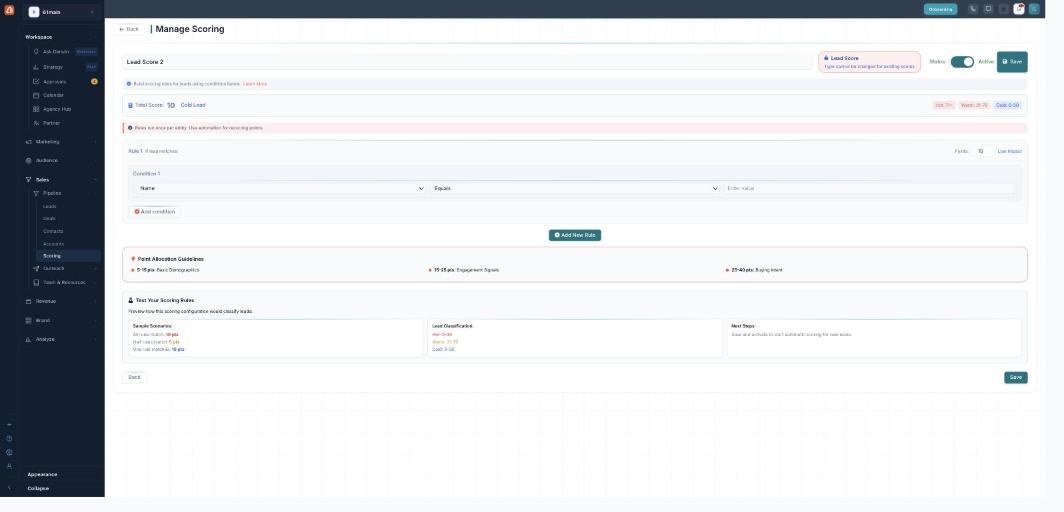
A live total, Hot/Warm/Cold bands, and a built-in test.
The total score (0–100)
Every rule that matches adds its points, and the totals from all of a record’s active scores are summed and capped at 0–100. The editor shows this Total Score live as you build, so you can see the effect of each rule.
Hot / Warm / Cold bands
The editor sorts a score into three bands, shown as chips: Hot (71+), Warm (31–70), and Cold (0–30) — a quick read on how strong a record is.
Test your rules
The Test Your Scoring Rules panel previews how your configuration would classify records before you commit — sample scenarios (all rules match, half match, one matches) and the resulting Hot / Warm / Cold classification. It’s a preview of the maths, so you can sanity-check the weights.
Save and activate
Flip Status to Active and click Save. Active scores recalculate automatically in the background whenever you change their rules — every matching record is re-scored, so you never have to run it by hand.
On your boards
The 0–100 total lands in the Score column on the Leads, Contacts, and Deals boards as a badge. Your rule-based score takes precedence; if a record type has no active rule score, the board can fall back to an AI score, shown with an AI badge. Configure a rule score and it takes over.
What’s next
- Back to the Scoring overview.
- See Score types & creating a score.
- See Building rules.