
Agency Hub is where an agency runs everything in one place — the clients you work for, the campaigns you run for them, the money they pay you, and the reports that prove your value. Instead of juggling spreadsheets, separate billing tools, and a pile of client logins, you get a single command center that keeps every account, every campaign, and every dollar in view.
It’s also built to be white-labeled. You can put your own name, colors, logo, and even your own web address on the platform, so your clients see your brand — not Marketing Titan’s. Darwin, your AI assistant, works quietly across all of it: surfacing the client that needs you most, generating reports, and scoring the health of every account so nothing slips.
Where to find it: Left menu → Agency Hub. It opens on the Overview tab, and seven tabs run across the top: Overview, Clients, Work, Money, Reports, Grow, and Settings. This page is the overview — each tab has its own detailed guide, linked below.
The seven tabs — each has its own guide
Everything in Agency Hub lives under one of seven tabs. Here’s what each one is for, and where to read more.
| Tab | What it’s for | Guide |
|---|---|---|
| Overview | Your executive dashboard — the health of the whole agency in one screen. | Open guide → |
| Clients | Every client and their linked brands, with contract, tier, and status. | Open guide → |
| Work | All campaigns you run for clients, across every channel. | Open guide → |
| Money | Retainers, renewals, subscriptions, overages, and commissions. | Open guide → |
| Reports | Advanced analytics and scheduled, automated client reports. | Open guide → |
| Grow | Pricing plans, snapshots, experiments, and referrals for your sub-accounts. | Open guide → |
| Settings | White-label branding, custom domain, portal, email, and notifications. | Open guide → |
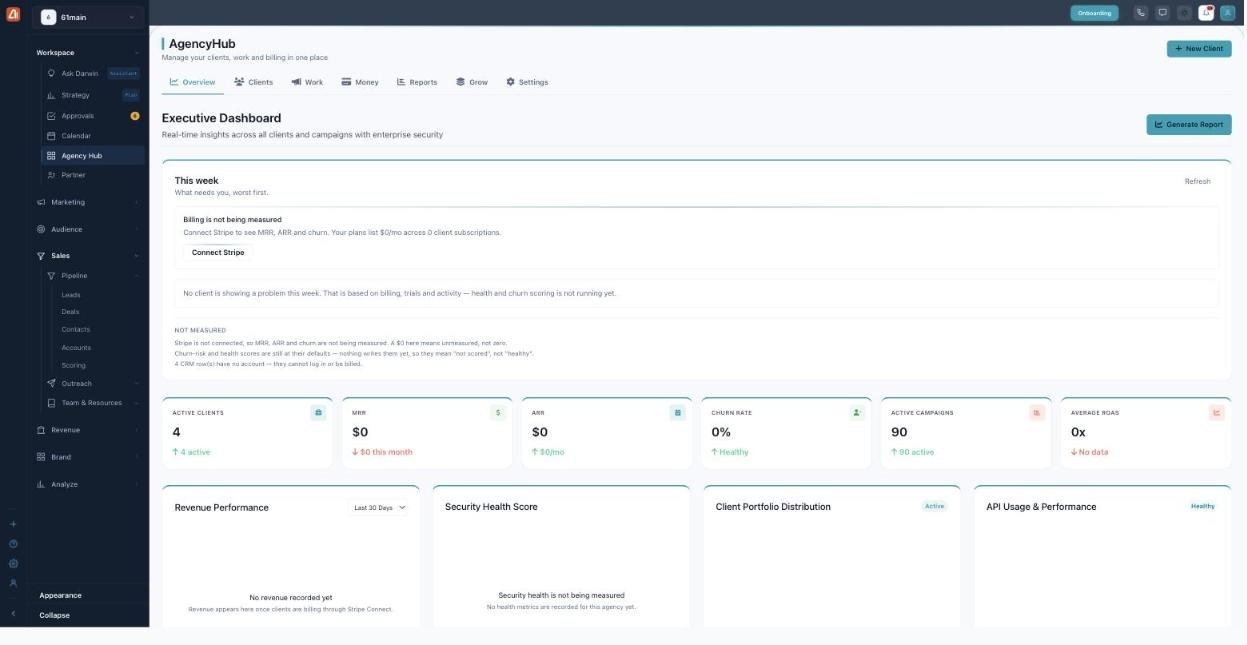
Agency Hub opens on the Overview dashboard — the seven tabs run across the top.
New to Agency Hub? Start with the Clients guide to add your first client, then connect Stripe so the Overview numbers come to life.
Who can use Agency Hub
Agency Hub is an agency feature — it’s available on agency-enabled plans. If you don’t see it in your left menu, your workspace isn’t set up as an agency yet, or your plan doesn’t include it. Once it’s on, the whole suite — the client portal and white-labeling included — unlocks together.
How Darwin helps agencies
Darwin turns a pile of client accounts into one manageable picture. It surfaces the client that needs you most in the “This week” panel, generates client-ready reports on demand, and scores the health and churn risk of every account so problems show up early — while you stay focused on the work. Connect Stripe and set your branding, and Darwin runs the whole agency view on autopilot.
Set-up order that works
- Add your clients — each one provisions its own sub-account. See Clients.
- Connect Stripe (Settings → Stripe Connect) so MRR, ARR, churn, and client billing start measuring.
- White-label the platform — name, colors, logo, and your own domain. See Settings.
- Record retainers so recurring revenue shows up. See Money.
- Build pricing plans to sell to sub-accounts. See Grow.
- Schedule reports so clients hear from you on a rhythm. See Reports.
Common questions
Why do MRR, ARR, and churn show $0?
Those numbers come from billing, and billing only flows in once you Connect Stripe (Settings → Stripe Connect). A $0 means “not measured yet,” not zero revenue. Full detail in the Overview guide.
Can I really white-label the whole platform?
Yes — your agency name, colors, logo, favicon, a custom domain, branded emails, and a client portal with agency branding hidden. See the Settings guide.
What’s the difference between a retainer and a subscription?
A retainer is what a client pays you for your work; a subscription is what a client pays for their platform plan. Both live in Money.
Don’t see Agency Hub? It’s an agency-plan feature — contact support to enable it. If billing shows $0, connect Stripe under Settings.
What’s next
- Add your first client — Clients guide.
- Read the Overview dashboard guide.
- White-label everything — Settings guide.
- Package what you sell — Grow guide.