
Blog

Blog - Authors

Author profiles power bylines and bios — and train an AI Ghostwriter to match each voice.

Beginner4 min read

Authors are the people behind your posts. Their profiles supply the byline and bio, and can train an AI Ghostwriter to write in their voice.

Where to find it: Left menu → Marketing → Web → Blog → Authors (the page is titled Blog Management). Part of the Blog guide.
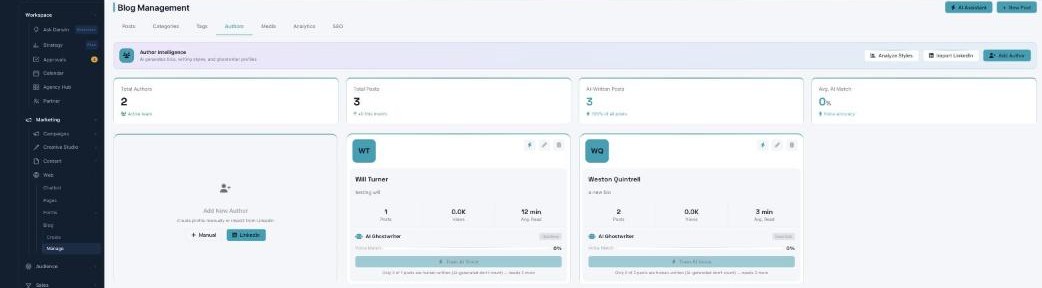
The Authors tab: Author Intelligence with Analyze Styles, Import LinkedIn, and Add Author; stats for Total Authors, Total Posts, AI-Written Posts, and Avg. AI Match; and author cards with an AI Ghostwriter voice-match panel.

Authors — real bylines, and an AI that writes like them.

Author profiles

Add an author with a Name, Email, Job Title, Company, Bio, and LinkedIn / Twitter links — or Import from LinkedIn to fill it in automatically. Each card shows their Posts, Views, and Avg. Read.

The AI Ghostwriter

Turn on Configure AI Voice and the AI studies an author’s real writing so AI-drafted posts sound like them — you’ll see a Voice Match Score, their Writing Traits, and a Ghostwriter Status. It needs at least 3 human-written posts to learn a voice.

Why the bio matters

A real author with a proper bio is an E-E-A-T signal — AI search engines weight it heavily, so a good bio directly raises a post’s AI Engine Score.

What’s next

Keep reading

  • Blog - Analytics

    See what your blog drives — views, visitors, time on page, leads, and conversions.

  • Blog - Writing a Post with AI

    Describe a topic and AI writes the whole post — plus LinkedIn, Twitter, Email, and social versions.

  • Blog Management

    A complete blogging platform — write posts with AI, organize them, publish to your site and social channels, and rank on Google and AI search engines.

More ways to get help

These guides are the same ones that sit inside the app’s help center, next to the screens they describe. If you prefer to watch, the Marketing Titan Academy has short video courses recorded in the product. Signed in, you can also ask Darwin, the built-in assistant, to explain a screen or do the step for you. If something is not covered here, contact us and a person will answer.

Try it yourself

Every guide here describes the live product.

Start free and follow along: every core module, unlimited users, no card required.