
The SEO tab keeps your whole blog search-ready, and GEO (Generative Engine Optimization) makes each post easy for AI search engines to cite.
Where to find it: Left menu → Marketing → Web → Blog → SEO (the page is titled Blog Management). Part of the Blog guide.
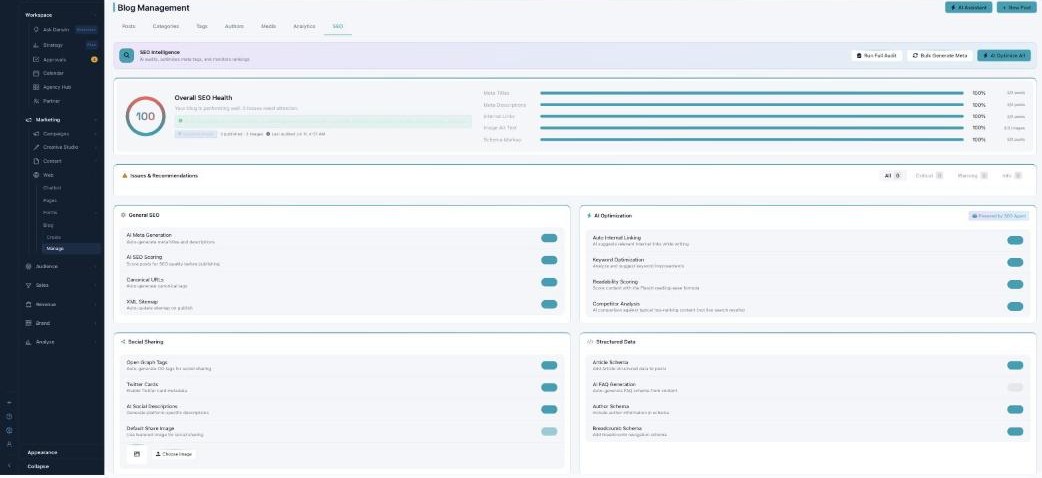
SEO & AI search — rank on Google, get cited by AI.
Blog-wide SEO
Overall SEO Health scores your blog and breaks it down by Meta Titles, Meta Descriptions, Internal Links, Image Alt Text, and Schema Markup. Run Full Audit, Bulk Generate Meta, or AI Optimize All to fix things in one go. Toggles turn on the automation: AI Meta Generation, Canonical URLs, XML Sitemap, Keyword Optimization, Readability Scoring, Open Graph / Twitter Cards, and Article / Author / Breadcrumb Schema.
The AI Engine Score (GEO)
Every post gets an AI Engine Score out of 100 — how easily an AI search engine (like ChatGPT or Google’s AI answers) can quote it. You’ll see it in the editor’s GEO Readiness card, with MISSING: suggestions to fix.
| What raises the score | Points |
|---|---|
| A FAQ block | 25 |
| Cited statistics with source links | 20 |
| An author bio (E-E-A-T) | 15 |
| Internal links | 10 |
| A named proprietary framework | 10 |
| Schema markup | 10 |
| A category | 5 |
| Tags | 5 |
The labels: Excellent (85+), Good (65+), Fair (45+), or Poor. Clear the MISSING items in the editor to climb the scale.
What’s next
- Back to Blog Management.
- See Writing with AI.
- See The editor.
- See Categories & Tags.
- See Authors.
- See Media Library.