
The Blog module is a complete blogging platform — write posts (with AI if you like), organize them, publish to your own website and social channels, and track how they perform. It’s built to rank on Google and be cited by AI search engines.
Where to find it: Left menu → Marketing → Web → Blog → Manage (the page is titled Blog Management).
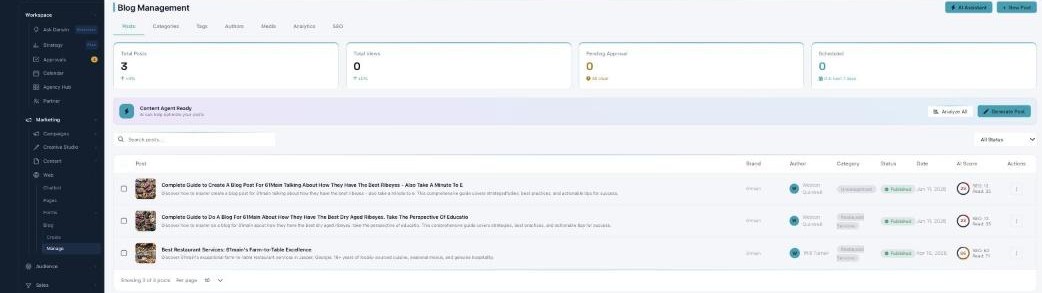
Blog Management — every post, and everything around it.
The seven tabs
| Tab | What it does |
|---|---|
| Posts | Every post, its status, and its AI score (this page). |
| Categories & Tags | Organize posts so they’re easy to find. |
| Authors | Author profiles and the AI Ghostwriter. |
| Media | Your blog images, with AI alt text. |
| Analytics | Views, leads, and traffic sources. |
| SEO | Search health and AI-search (GEO) settings. |
The Posts list
The Posts tab lists every post with its brand, author, category, status (Draft, Pending, Scheduled, Published, or Archived), date, and an AI Score (its SEO score and read time). The cards up top track Total Posts, Total Views, Pending Approval, and Scheduled. Search and filter by status, or select several posts for a bulk Publish, Archive, or Delete.
What you can do with a post
Each post’s ⋮ menu covers Edit Post, Version History, Schedule, Duplicate, and Delete — and, for a post awaiting review, Approve or Request Changes. The Content Agent can Analyze All your posts for improvements or Generate a new one.
Two ways to write
Start a post from a topic with the AI generator, or write it yourself in the full editor. Either way you end up in the editor to polish, optimize, and publish it.
Learn each part
| Topic | What it covers | Guide |
|---|---|---|
| Writing with AI | Generate a full post from a topic. | Open → |
| The editor | Write, repurpose, optimize, and publish. | Open → |
| Categories & Tags | Organize your posts. | Open → |
| Authors | Profiles and the AI Ghostwriter. | Open → |
| Media Library | Images, alt text, and optimization. | Open → |
| Analytics | How your blog performs. | Open → |
| SEO & AI search | Ranking and the AI Engine Score. | Open → |
Written to be found — by people and AI
Every post carries an AI Engine Score (GEO) for how well AI search engines can cite it, alongside classic SEO. Generating and writing posts is part of your plan — there are no per-post credits to worry about.
What’s next
- Write your first post with AI.
- Polish it in the editor.
- Tune it for search & AI (GEO).