
Week view is the seven-day time grid — each day is a column, each hour a row, and every item sits at its actual time.
Where to find it: Left menu → Calendar → the Week tab. Part of the Calendar guide.
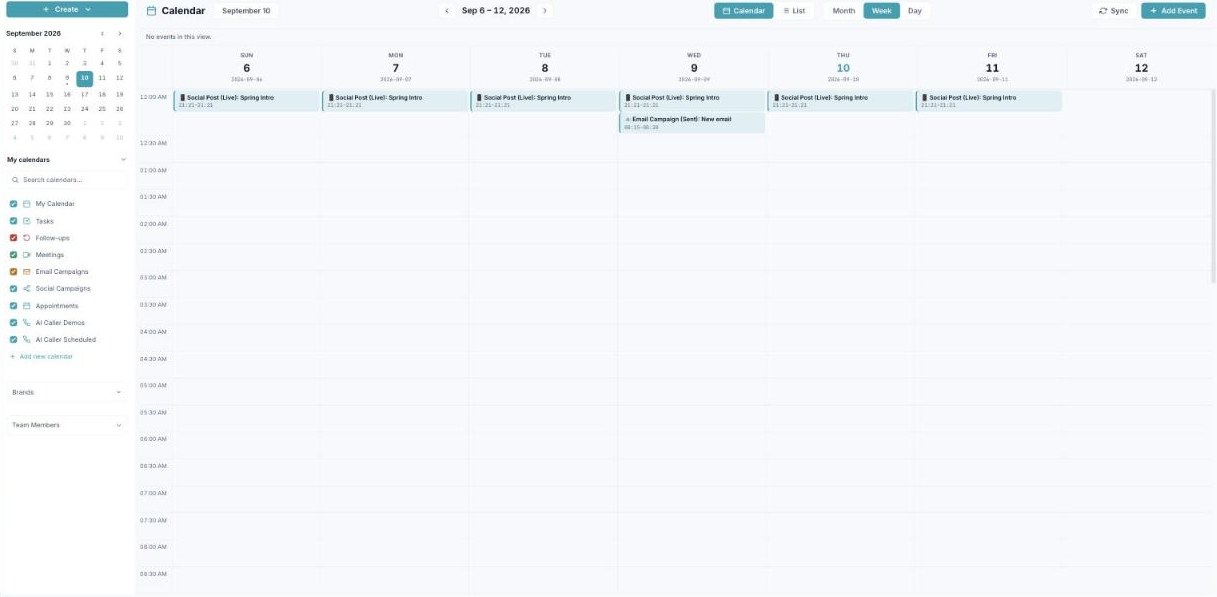
Week view lays out seven days as a time grid, so you see exactly when things happen.
Reading the grid
The week runs Sunday to Saturday across the top, with hours down the side. Timed items appear as blocks at their start–end time, so overlaps and back-to-backs are obvious. The header shows the week’s date range (e.g. “Sep 6 – 12”).
When to use it
Week view is best for scheduling — seeing how a single week fills up hour by hour and finding a free slot. Use the arrows to step forward or back a week.
What’s next
- Back to the Calendar overview.
- See Month view.
- See Day view.
- See List view.
- See Creating an event.
- See Calendars & colors.
- See Appointment scheduling.