
The Calendar is one place to see everything scheduled across your marketing — social posts, email campaigns, meetings, tasks, follow-ups, appointments, and AI caller sessions — all color-coded, in whatever view suits you.
Where to find it: Left menu → Calendar.
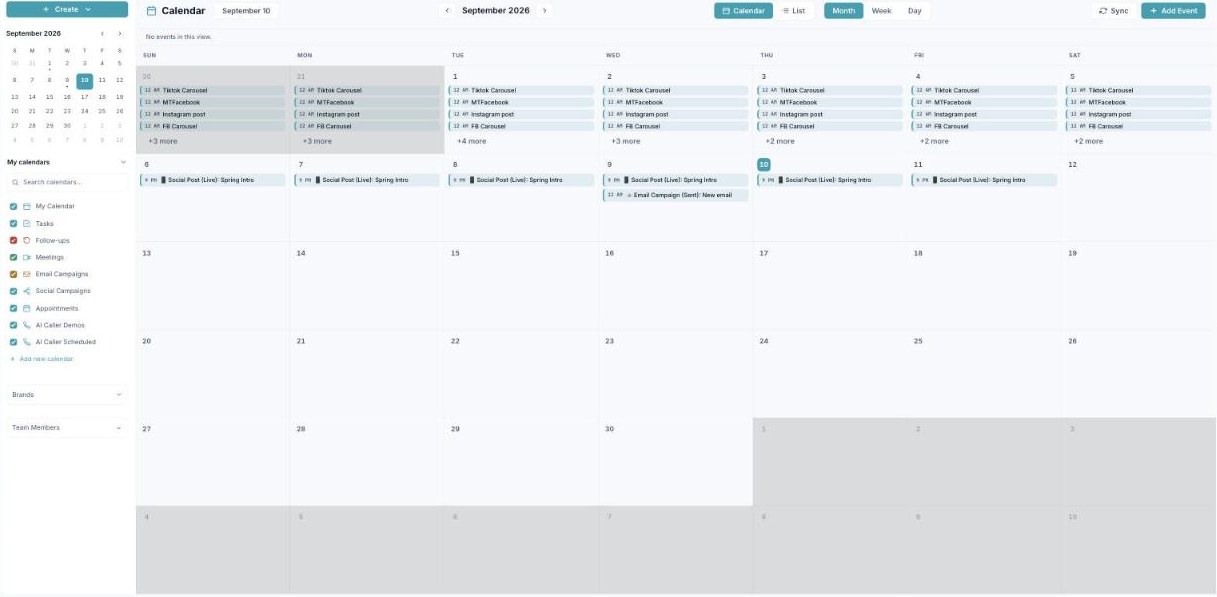
The Calendar — every scheduled item, color-coded, in one view.
Four ways to view it
Switch views from the top toolbar — the same items, shown differently:
| View | Best for | Guide |
|---|---|---|
| Month | Planning the whole month at a glance. | Open → |
| Week | Scheduling a week hour by hour. | Open → |
| Day | A single busy day, in detail. | Open → |
| List | Reading down what’s coming, by type. | Open → |
Working with it
| Topic | What it covers | Guide |
|---|---|---|
| Creating an event | The Add Event dialog — events vs. tasks, time, guests, reminders. | Open → |
| Calendars & color-coding | The color-coded layers that pull in each module’s schedule, plus Sync. | Open → |
| Appointment scheduling | Publish a booking page so customers can book time with you. | Open → |
One calendar, every module
You don’t schedule campaigns or calls here — you schedule them in their own modules and they appear here automatically, color-coded by kind. The calendar is your single source of “what’s happening, and when.”
What’s next
- Start in Month view to see the big picture.
- Understand the colors in Calendars & color-coding.
- Add your first item with Creating an event.