
Email marketing in Marketing Titan is built around Darwin, the AI that writes and designs your emails for you. You describe what you want in plain words — Darwin writes the subject line, drafts the copy, builds the layout, and can even plan a whole series. You review, tweak, and send.
This page is your starting point. It covers the two ways to email — a one-time Email Campaign and an ongoing Sequence — plus the Email Template Builder and how to track your results. Each section links out to a full step-by-step guide when you want the details.
Where to find it: Open the left menu and go to
Marketing → Campaigns. From there, pick Email Campaigns to send a one-time email or Sequences to build a series. The Email Template Builder lives underMarketing → Campaignstoo.
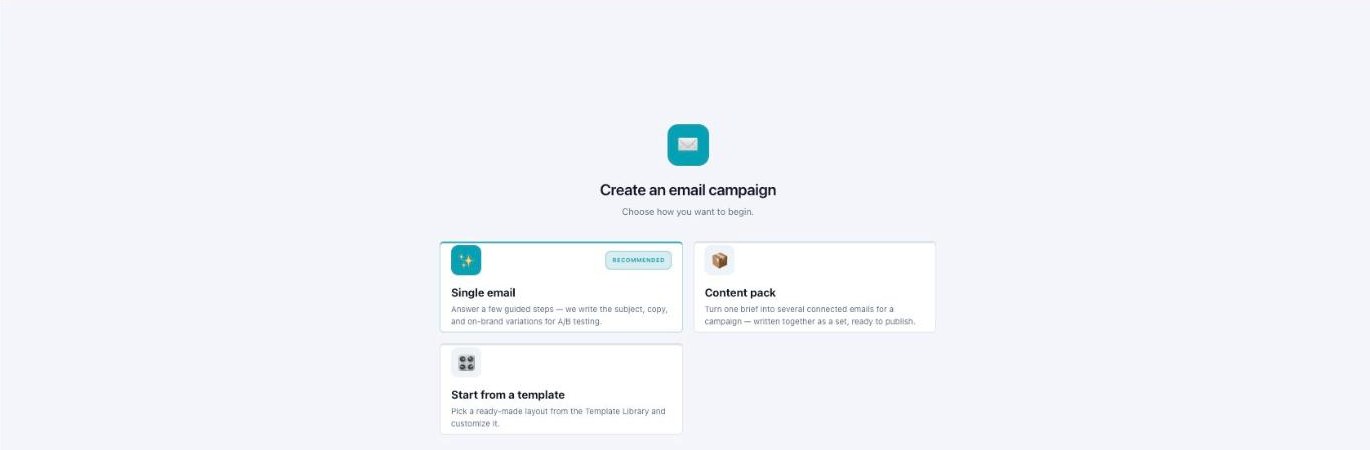
Two ways in — a single campaign or a content pack, or start from a template.
What you can do with email marketing
With Darwin doing the heavy lifting, you can:
- Write emails from a sentence. Describe the goal and Darwin writes the subject line and copy for you.
- Design the layout automatically. Darwin builds the whole creative, or you can start from a ready-made template.
- Send a single email — like a product launch, promo, or newsletter.
- Build a series over time — like a welcome series or an abandoned-cart win-back that sends on its own schedule.
- Reach people on more than email — a sequence can also use SMS, LinkedIn, and an AI voice call.
- See how you’re doing with dashboards for open rate, click rate, revenue, and more.
Two ways to email: campaign vs sequence
Not sure which one to use? A campaign is a single email you send once. A sequence is a series of messages that go out over days or weeks, on their own schedule. Here’s a quick guide.
| Email Campaign | Sequence | |
|---|---|---|
| What it is | One email, sent one time. | A series of messages sent over time. |
| Best for | Announcements, promos, newsletters, event invites. | Onboarding, cart recovery, lead nurture, re-engagement. |
| Timing | Send now (or after you review). | Runs on a schedule — for example immediately, then Day 2, Day 5, Day 9. |
| Channels | Email. | Email, SMS, LinkedIn, and AI Call. |
| Starts from | The AI Email Builder. | A goal preset (like Welcome series). |
The sections — each has its own guide
Email Marketing is organized into the areas below. Open any one for the full, detailed walkthrough.
| Section | What it covers | Guide |
|---|---|---|
| One-time Campaigns | Send a single email to a list. | Open guide → |
| Sequences | Build a series of emails that go out over time. | Open guide → |
| Template Builder | Design reusable email templates. | Open guide → |
| Track Results & Tips | Measure performance, connect a provider, and tips for opens. | Open guide → |
Common questions
What’s the difference between a campaign and a sequence?
A campaign is a single email you send once. A sequence is a series of messages that go out over time on a schedule — and it can use SMS, LinkedIn, and AI Call as well as email.
How many credits does an email cost?
A typical campaign run makes 4 variations at about 8 credits (2 per variation); adding AI hero images raises it (up to ~16). A typical sequence run is about 4 messages for around 4 credits (1 per send).
Do I have to write the email myself?
No. Darwin writes the subject line and copy and designs the layout from your description. You review and edit, or ask for changes in plain words.
Can I use my own design instead of AI?
Yes. In Express mode choose Choose a template instead of AI Create, or use the Email Template Builder and then Open in Builder to edit.
What is the Performance Prediction?
It’s an AI estimate of how your email or sequence might do — a predicted open rate for campaigns, and a quality score with predicted open and reply rates for sequences. For campaigns, add a subject line to see it.
Can a sequence reach people outside of email?
Yes. A sequence can use Email, SMS, LinkedIn, and AI Call. The AI routes each step to the channel that fits best.
Why do my totals look lower than expected?
If an email account is disconnected, those messages don’t send and aren’t counted. Reconnect the provider on the Integrations page.
Having trouble?
Messages not sending? The most common cause is a disconnected email account. You’ll often see a warning like “messages did not send — OAuth account not found or inactive,” and those messages won’t count in your totals. To fix it, go to the Integrations page and reconnect your email provider (Gmail, Outlook, SendGrid, or Mailchimp). Then send a test to yourself to confirm it’s working.
What’s next
- Open the One-time Campaigns guide.
- Open the Sequences guide.
- Open the Template Builder guide.
- Open the Track Results & Tips guide.