
You don’t build a strategy by hand — you brief a goal and Darwin builds it. There are three ways in, and they all end at the same generated plan (phases, tasks, calendar, KPIs, and pre-written content).
Where to find it: Left menu → Workspace → Strategy → Draft live from a goal (or + New strategy). Part of the Strategy guide.
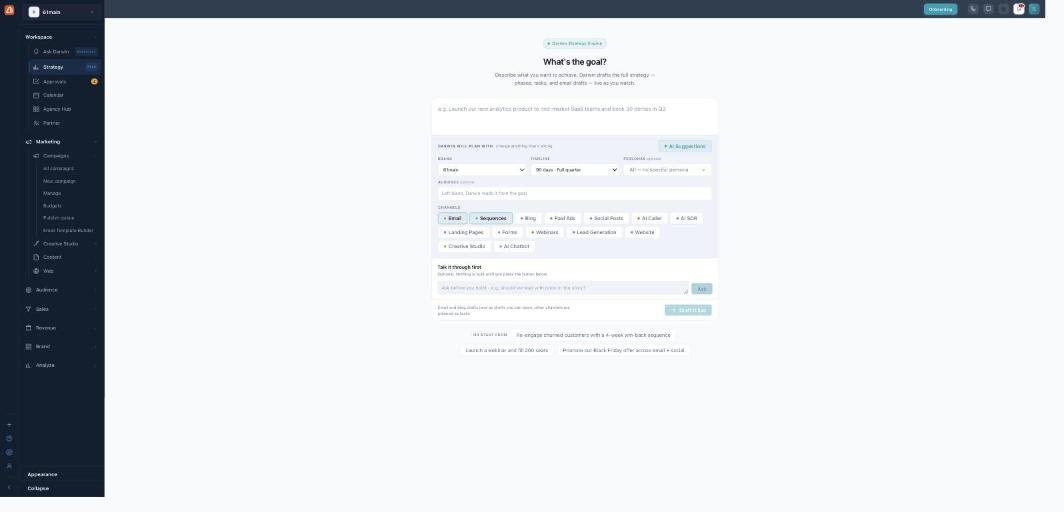
Draft live from a goal — type what you want, Darwin plans the rest.
1. Draft live from a goal
The fastest path. In the What’s the goal? box, describe what you want (e.g. “Re-engage churned customers with a 4-week win-back sequence”). The Darwin will plan with rail shows the defaults — Brand, Timeline, and Persona — which you can change, and the channels grid lets you pick which channels are in play. Hit Draft it live and the plan builds in front of you as Darwin writes it. Not sure yet? Talk it through first opens a chat with Darwin before anything is built.
2. The New Strategy wizard
A guided 6-step version of the same thing, good when you want to make each choice deliberately:
| Step | You choose |
|---|---|
| 1. Brand | Which brand this is for (sets the voice and assets). |
| 2. Goal | Your primary goal (more leads, nurture pipeline, launch a product, re-engage, grow awareness, retention) or free text. |
| 3. Audience | Who you’re targeting, plus specific personas from the brand. |
| 4. Channels & timeline | Which channels (Email, Sequences, Blog, Paid Ads, Social, AI Caller, AI SDR, Landing Pages, Forms, Webinars, and more) and the timeframe (30/60/90 days, 6 or 12 months). |
| 5. Budget & team | A budget tier and your team structure (which sets the approval chain). |
| 6. Preview | A summary of every choice and what Darwin will generate, then Generate strategy. |
3. Quick Start from a website
On starter plans, Start from a website is the easiest on-ramp: paste your website URL, Darwin analyzes it, shows you the industry and facts it detected (you can correct them before anything generates), then proposes strategies to run with.
What Darwin generates
However you start, Darwin (the platform’s AI) produces a full plan: 4 phases across your timeline, week-by-week tasks, a calendar, KPI targets and a budget split, and a pre-written content draft for every task (emails, sequences, posts, and more). It’s grounded in your real brand, personas, and past send performance — not generic filler. Nothing is sent; you review it next.
What’s next
- Back to the Strategy overview.
- See Gantt.
- See AIOS Calendar.
- See Staged Drafts & approvals.
- See What’s Running.
- See Strategy Report.
- See Review & Steer.