
Open any strategy and the Gantt tab is the map of the whole plan. Phases run down the left, weeks run across the top, and each task sits as a bar in the week it’s scheduled for.
Where to find it: Left menu → Workspace → Strategy → a strategy → Gantt. Part of the Strategy guide.
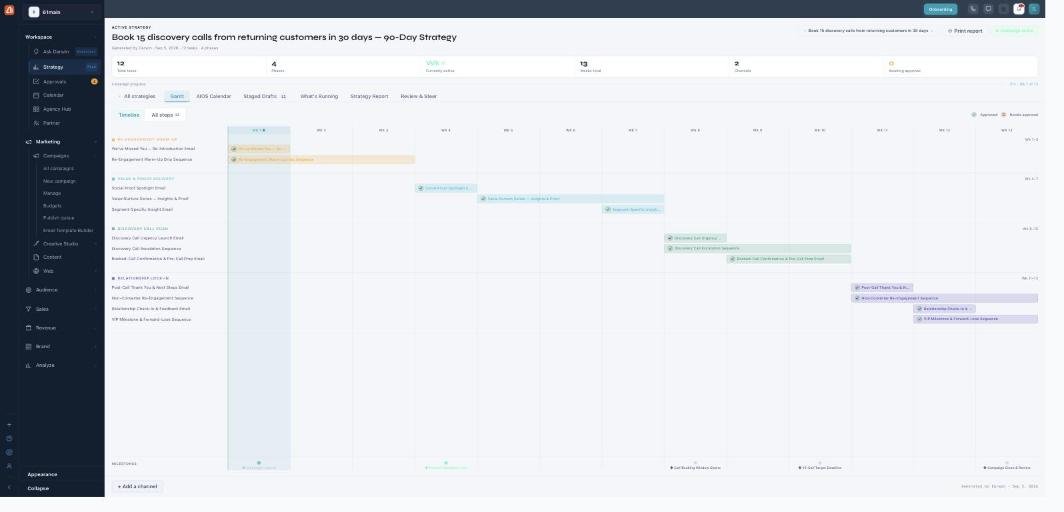
The Gantt — your strategy as phases across the weeks.
The header
At the top, quick stats sum up the plan: total tasks, phases, the current week (Wk X of Y), weeks total, channels, and how many items are awaiting approval. Print report and Activate strategy sit on the right.
Phases & tasks
Every strategy is built from four phases — typically an awareness/warm-up phase, a nurture/proof phase, a conversion push, and a retention/lock-in phase. Each phase holds its tasks (an email, a sequence, a post), shown as bars in their scheduled week. The milestones row along the bottom marks key dates.
Editing before approval
While the plan is still awaiting your approval, the Gantt is editable — move, resize, or reorder tasks to reshape the timeline. Use + Add a channel to bring another channel into the plan. The Approved / Needs approval markers show what’s been signed off.
What’s next
- Back to the Strategy overview.
- See Create a strategy.
- See AIOS Calendar.
- See Staged Drafts & approvals.
- See What’s Running.
- See Strategy Report.
- See Review & Steer.