
Team Management

Team Hierarchy: Organizational Structure

The read-only overview: every agent indented by hierarchy level, with role, territory, team and performance.

Beginner3 min read

Organizational Structure is the read-only overview of your team — every agent listed and indented by their level in the hierarchy, so you can see the whole shape at a glance.

Where to find it: Left menu → Sales → Team & Resources → Sales Teams → Team Hierarchy → Organizational Structure. Part of the Team Management guide.
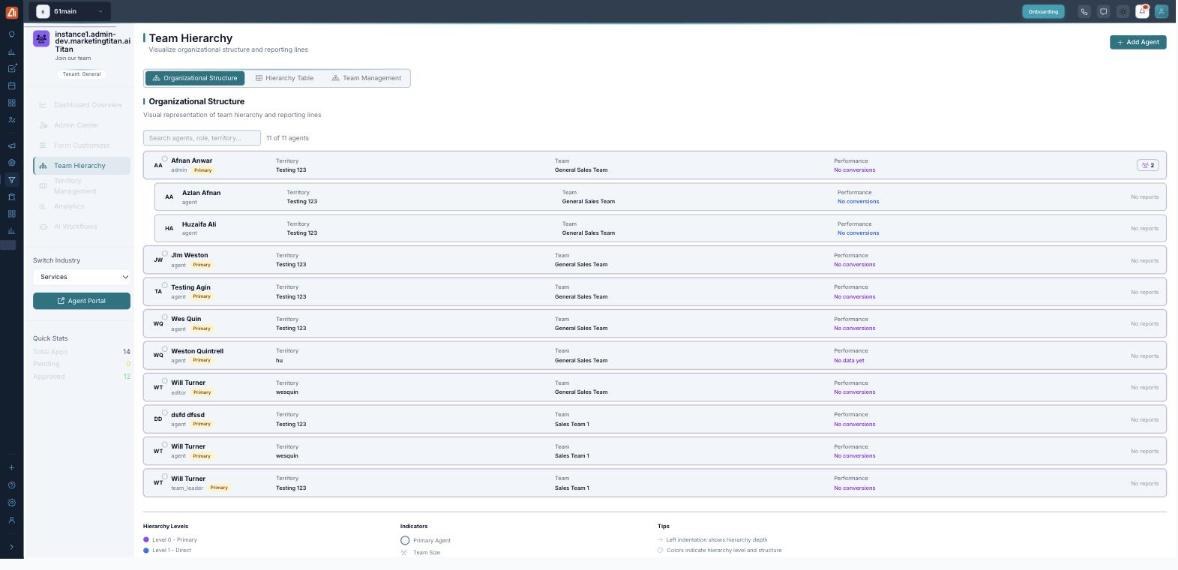
The Organizational Structure sub-tab: a search box, an agent count (11 of 11 agents), and a row per agent showing name, role (admin, agent, editor, team_leader), a Primary badge, Territory, Team and Performance, with a legend for hierarchy levels and indicators below.

Organizational Structure — every agent, indented by hierarchy level.

What each row shows

ColumnMeaning
AgentName and role — admin, agent, editor or team leader — with a Primary badge on primary agents.
TerritoryThe territory the agent covers.
TeamThe team the agent belongs to.
PerformanceConversions to date (for example “No conversions”).

Read the chart

  1. Open Team Hierarchy → Organizational Structure.
  2. Use the search box to jump to an agent, role or territory.
  3. Read the indentation — it shows hierarchy depth; colors mark the hierarchy level (Level 0 Primary, Level 1 Direct).
  4. Check the agent count (for example 11 of 11 agents) to confirm everyone is placed.

💡 Read-only: This view is for seeing the structure. To change it, use the Hierarchy Table (downlines) and Team Management (teams).

FAQ

What does the Primary badge mean?

It marks a primary agent — Level 0 in the hierarchy — as shown in the legend.

Why is someone missing?

Only approved agents appear. Approve them in the Admin Center first.

Can I edit an agent here?

This sub-tab is the overview; make changes in the Hierarchy Table or Team Management.

Keep reading

  • Analytics

    Read the revenue, agent and territory charts and the onboarding pipeline to spot bottlenecks and top performers.

  • Team Hierarchy: Overview

    The org chart module and its three sub-tabs — Organizational Structure, Hierarchy Table and Team Management — and how they fit together.

  • Team Hierarchy: Hierarchy Table

    The working downline table: group by territory/team/hierarchy, expand downlines, and act on each agent with team size, performance and revenue.

More ways to get help

These guides are the same ones that sit inside the app’s help center, next to the screens they describe. If you prefer to watch, the Marketing Titan Academy has short video courses recorded in the product. Signed in, you can also ask Darwin, the built-in assistant, to explain a screen or do the step for you. If something is not covered here, contact us and a person will answer.

Try it yourself

Every guide here describes the live product.

Start free and follow along: every core module, unlimited users, no card required.