
Ask Darwin

Ask Darwin - Home

Where Ask Darwin starts — your account, plan, and connection status at a glance.

Beginner3 min read

Home is where Ask Darwin starts. It confirms which account you’re working in and that your AI team is ready.

Where to find it: Left menu → Ask Darwin → the Home tab. Part of the Ask Darwin guide.
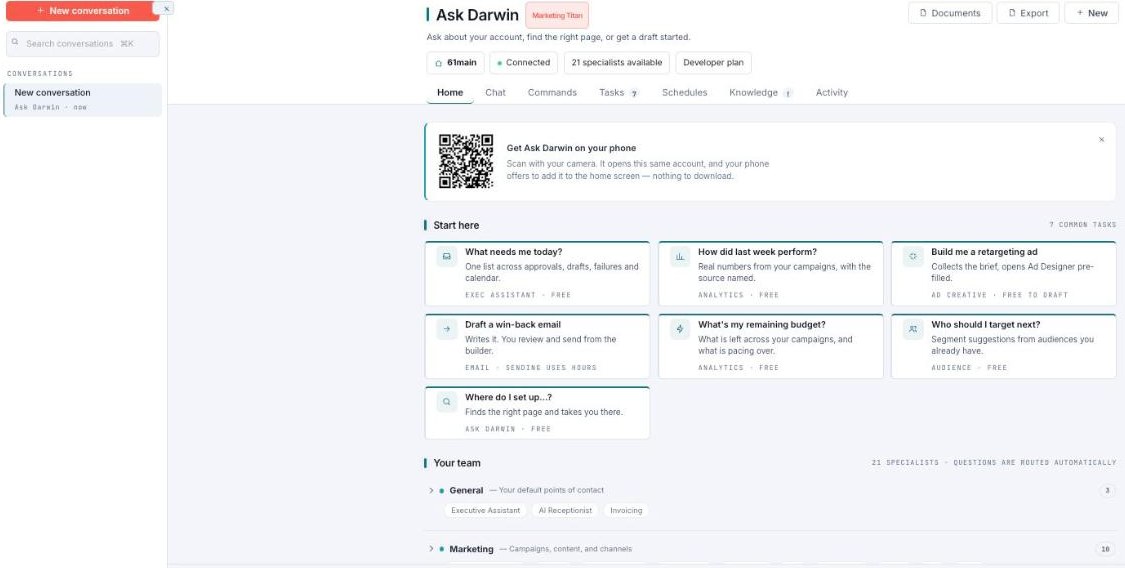
Ask Darwin Home tab showing the account (61main), plan, Connected status, and specialists available.

Ask Darwin opens on Home — your account and connection status.

What you see

The header shows your brand/account, your plan, a Connected status, and how many specialists are available (Ask Darwin ships with a team of AI specialists). From here you move into Chat to ask something, or any other tab.

What’s next

Keep reading

More ways to get help

These guides are the same ones that sit inside the app’s help center, next to the screens they describe. If you prefer to watch, the Marketing Titan Academy has short video courses recorded in the product. Signed in, you can also ask Darwin, the built-in assistant, to explain a screen or do the step for you. If something is not covered here, contact us and a person will answer.

Try it yourself

Every guide here describes the live product.

Start free and follow along: every core module, unlimited users, no card required.