
Analytics turns your conversations into numbers — how much the AI resolves on its own, how happy customers are, and which topics come up most.
Where to find it: Left menu → AI Chatbot → Analytics. Part of the AI Chatbot guide.
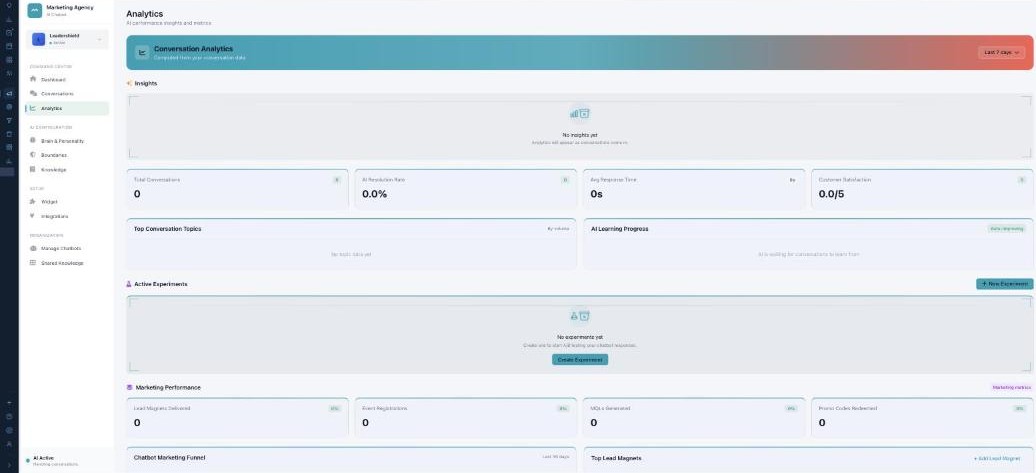
Analytics — is your AI actually helping?
The core numbers
Pick a date range, then read the metric cards: Total Conversations, AI Resolution Rate, Avg Response Time, and Customer Satisfaction (out of 5). Top Conversation Topics ranks what people ask by volume (with resolution and rating), and AI Learning Progress shows where the AI is improving.
A/B experiments
Active Experiments let you test the AI against itself — try two versions of its tone, response length, message format, greeting, or emoji usage, split traffic 50/50, and End & Apply Winner once one performs better.
Marketing results
Marketing Performance tracks what the chatbot drives: Lead Magnets Delivered, Event Registrations, MQLs Generated, and Promo Codes Redeemed, plus a Chatbot Marketing Funnel, your Top Lead Magnets, and Campaign Attribution (leads, cost per lead, MQL rate).
What’s next
- Back to the AI Chatbot overview.
- See Managing your chatbots.
- See Brain & Personality.
- See Boundaries.
- See Knowledge.
- See Shared Knowledge.