
Shared Knowledge (the Organization Knowledge Base) is a single set of sources available to every chatbot in your workspace — so common facts live in one place instead of being re-added to each bot.
Where to find it: Left menu → AI Chatbot → Shared Knowledge. Part of the AI Chatbot guide.
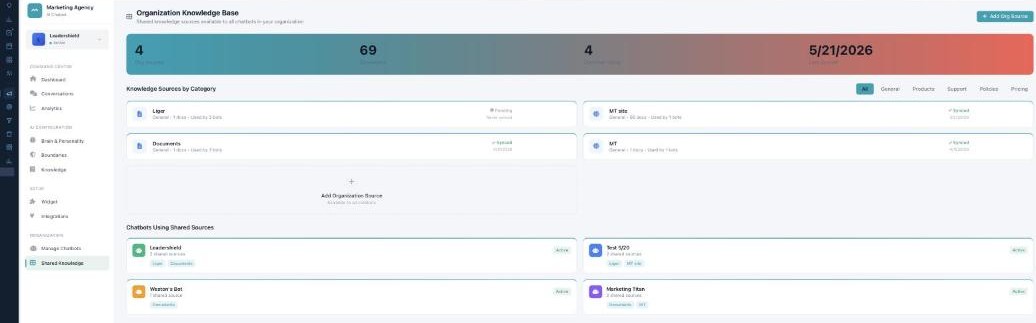
Shared Knowledge — write it once, every bot knows it.
What's in it
The banner shows Org Sources, total Documents, Chatbots Using them, and Last Synced. Sources are grouped by category (General, Products, Support, Policies, Pricing), and each shows how many docs it holds, how many bots use it, and its sync status (Synced / Syncing / Error / Pending). Hover a source to Resync, Edit, Manage Access, or Delete.
Adding & assigning
Add Org Source uses the same source types as a bot’s Knowledge (website, documents, Notion, Google Drive, Confluence, API, manual). Manage Access / Assign toggles exactly which chatbots can use a source.
Shared vs per-bot
Chatbots Using Shared Sources shows which bots draw on which sources. Whether a bot actually uses them is decided on its own Knowledge page under Inheritance — so shared knowledge is the library, and each bot chooses how much of it to read.
What’s next
- Back to the AI Chatbot overview.
- See Managing your chatbots.
- See Brain & Personality.
- See Boundaries.
- See Knowledge.
- See The web Widget.