
AI Chatbot lets you build AI assistants that chat with your website visitors — answering questions, capturing leads, and handing off to your team when needed. You can run several chatbots, each with its own personality, rules, and knowledge.
Where to find it: Left menu → AI Chatbot. It opens its own menu; the landing page is the Command Center.
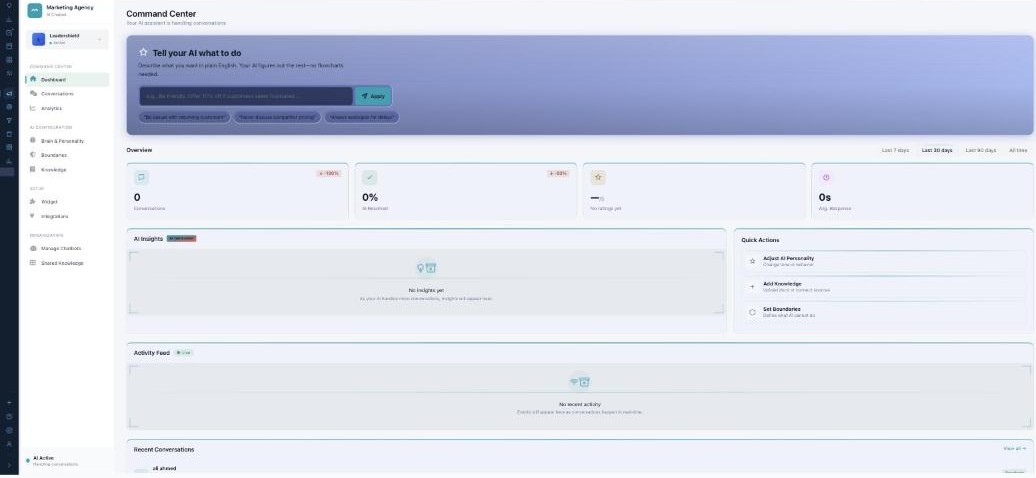
The Command Center — tell your AI what to do in plain English, and watch it work.
Its own menu
Opening AI Chatbot gives it a full left menu, in four groups:
| Group | Pages |
|---|---|
| Command Center | Dashboard (this page), Conversations, Analytics. |
| AI Configuration | Brain & Personality, Boundaries, Knowledge. |
| Setup | Widget, Integrations. |
| Organization | Manage Chatbots, Shared Knowledge. |
How it’s organized
Your workspace can hold many chatbots, and each one owns its own brain, boundaries, knowledge, and widget. The chatbot selector at the top of the menu decides which bot you’re editing. Above all the bots sits Shared Knowledge — an organization-wide library every bot can draw from.
The Command Center
The landing page is your dashboard. The star feature is “Tell your AI what to do” — describe what you want in plain English (for example, “Be friendly. Offer 10% off if customers seem frustrated”) and press Apply; no flowcharts. Below it, Overview shows Conversations, AI Resolved, Satisfaction, and Avg. Response for the last 7 / 30 / 90 days or all time, alongside AI Insights, Quick Actions, a live Activity Feed, and Recent Conversations.
Learn each part
| Page | What it does | Guide |
|---|---|---|
| Manage Chatbots | Create and switch between your assistants. | Open → |
| Brain & Personality | Voice, canned answers, and human handoff. | Open → |
| Boundaries | Hard rules the AI never breaks. | Open → |
| Knowledge | Train a bot on your content. | Open → |
| Shared Knowledge | One knowledge base for every bot. | Open → |
| Widget | The chat bubble for your website. | Open → |
| Integrations | Connect your tools and channels. | Open → |
| Conversations | The inbox, and human takeover. | Open → |
| Analytics | Performance and marketing results. | Open → |
You’re always in control
Boundaries set hard limits the AI can’t cross, and you can take over any conversation as a human at any moment. AI Chatbot is included on Scale and above (or as an add-on).
What’s next
- Create your first chatbot.
- Give it a personality and knowledge.
- Set its boundaries, then add the widget to your site.