
AI Chatbot

AI Chatbot - Boundaries

Hard rules your AI never breaks, no matter how a customer asks.

Beginner4 min read

Boundaries are the hard limits your AI will never break, regardless of how a customer phrases a request. This is how you keep it safe and on-brand.

Where to find it: Left menu → AI Chatbot → Boundaries. Part of the AI Chatbot guide.
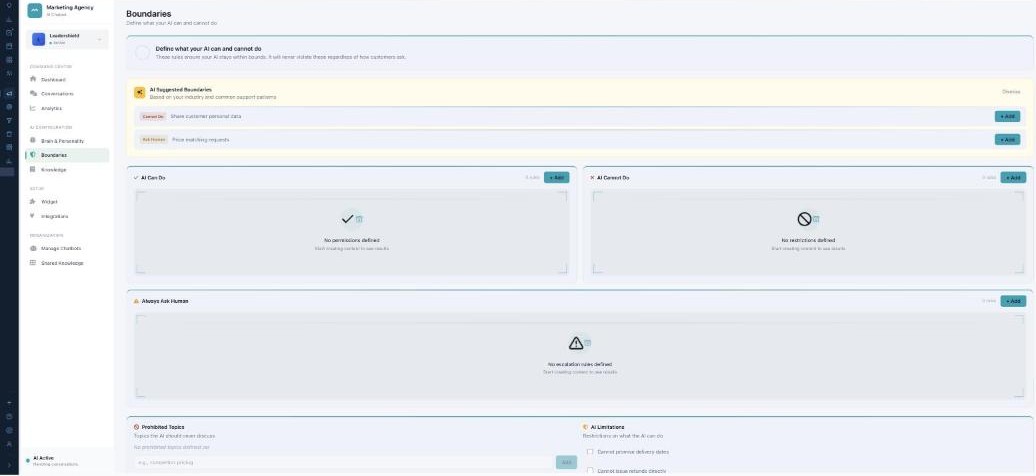
The Boundaries page: AI Suggested Boundaries, side-by-side AI Can Do and AI Cannot Do lists, an Always Ask Human section, and Prohibited Topics plus AI Limitations.

Boundaries — the guardrails your AI can't cross.

Can do / cannot do

Start from AI Suggested Boundaries (based on your industry) or add your own. Fill in AI Can Do (what it’s allowed to handle) and AI Cannot Do (what it must refuse), and use Always Ask Human for situations that need a person’s approval.

Topics and limits

Prohibited Topics are subjects the AI should never discuss (for example, competitor pricing). AI Limitations are ready-made restrictions you can switch on — such as “cannot promise delivery dates” or “cannot issue refunds directly.”

Test it before you ship

Use Test Your Boundaries to type a tricky question (“Can you give me 20% off?”) and see exactly how the AI would respond — Allowed, Blocked, or Escalate — and which rule decided it.

What’s next

Keep reading

  • AI Chatbot - Analytics

    How your AI is performing — resolution, satisfaction, top topics, A/B tests, and marketing results.

  • AI Chatbot — Your AI Command Center

    Build AI assistants that chat with your visitors, answer questions, capture leads, and hand off to your team — each with its own personality, rules, and knowledge.

  • AI Chatbot - Integrations

    Connect your CRM, support tools, and messaging channels like WhatsApp and SMS.

More ways to get help

These guides are the same ones that sit inside the app’s help center, next to the screens they describe. If you prefer to watch, the Marketing Titan Academy has short video courses recorded in the product. Signed in, you can also ask Darwin, the built-in assistant, to explain a screen or do the step for you. If something is not covered here, contact us and a person will answer.

Try it yourself

Every guide here describes the live product.

Start free and follow along: every core module, unlimited users, no card required.