
Conversations is the shared inbox for every chat your bots handle. You can watch the AI answer, see how confident it is, and step in as a human at any time.
Where to find it: Left menu → AI Chatbot → Conversations. Part of the AI Chatbot guide.
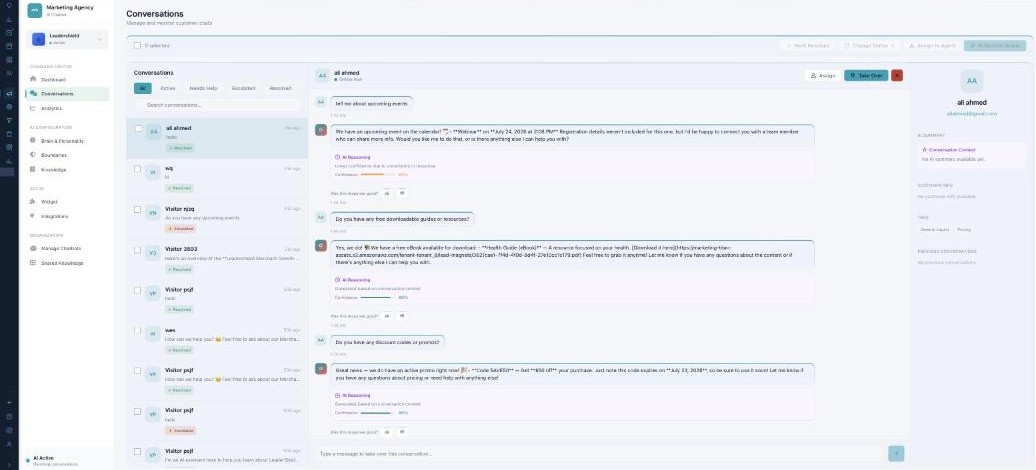
Conversations — every chat, and the handoff to your team.
Finding a chat
Filter the list by All, Active, Needs Help, Escalated, or Resolved, and search by name or message. Each row shows a status tag (AI Handling, Needs Help, Resolved, Escalated). Select several to Mark Resolved, Change Status, Assign to Agent, or AI Resolve Similar in bulk.
Reading a conversation
The transcript shows the customer, the AI, and any human agent. Every AI reply includes an AI Reasoning note and a Confidence score, plus a thumbs up/down so you can rate it and help it learn.
Taking over
Click Take Over to jump in as a human (the customer is told an agent has joined), then Return to AI when you’re done. Assign transfers the chat to a specific agent — automatically (by your routing method) or by choosing one — and marking a chat resolved can send a satisfaction survey or a resolution summary.
The customer panel
The right panel gathers everything about the person: their email, an AI Summary of the conversation, Customer Info (location, orders, lifetime value), Tags, and their Previous Conversations.
What’s next
- Back to the AI Chatbot overview.
- See Managing your chatbots.
- See Brain & Personality.
- See Boundaries.
- See Knowledge.
- See Shared Knowledge.