
AI Chatbot

AI Chatbot - Integrations

Connect your CRM, support tools, and messaging channels like WhatsApp and SMS.

Beginner3 min read

Integrations connect your chatbot to the tools you already use — and extend it beyond your website to messaging channels.

Where to find it: Left menu → AI Chatbot → Integrations. Part of the AI Chatbot guide.
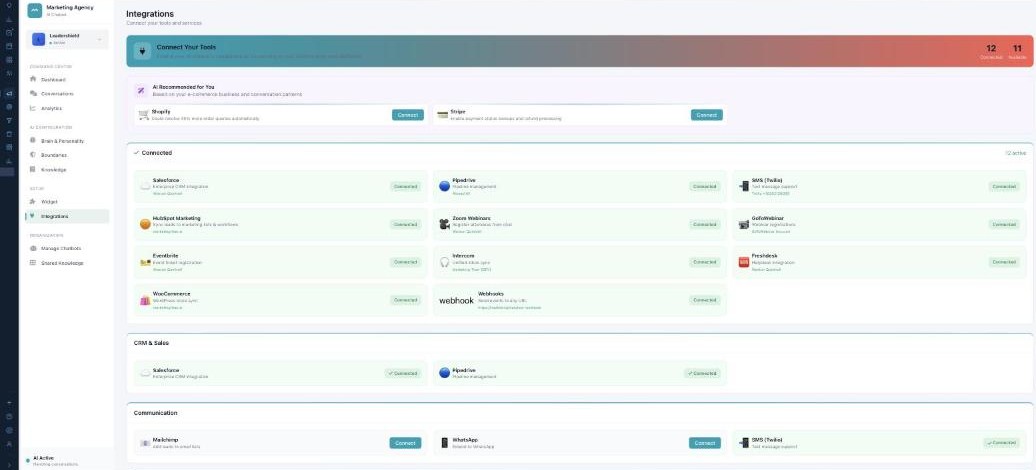
The Integrations page: Connected and Available counts, AI-recommended tools, and connected integrations grouped by CRM & Sales and Communication (Salesforce, Pipedrive, WhatsApp, SMS/Twilio, and more).

Integrations — plug your chatbot into the rest of your stack.

Connecting tools

The page shows how many integrations are Connected vs Available, plus AI Recommended picks for your business. Click Connect on any tile to link it.

What you can connect

CategoryExamples
CRM & SalesSalesforce, Pipedrive.
CommunicationWhatsApp, SMS (Twilio), Mailchimp.
Marketing AutomationHubSpot, ActiveCampaign, Klaviyo, ConvertKit.
Events & WebinarsZoom Webinars, GoToWebinar, Eventbrite, Calendly.
SupportZendesk, Intercom, Freshdesk.
E-commerceStripe, Shopify, WooCommerce.
DeveloperWebhooks, REST API, Zapier.

WhatsApp and SMS let your assistant answer beyond the website widget, and SMS agent alerts use the Twilio connection.

What’s next

Keep reading

  • AI Chatbot - Analytics

    How your AI is performing — resolution, satisfaction, top topics, A/B tests, and marketing results.

  • AI Chatbot - Conversations

    The shared inbox of every chat — watch the AI work, and take over when you want to.

  • AI Chatbot — Your AI Command Center

    Build AI assistants that chat with your visitors, answer questions, capture leads, and hand off to your team — each with its own personality, rules, and knowledge.

More ways to get help

These guides are the same ones that sit inside the app’s help center, next to the screens they describe. If you prefer to watch, the Marketing Titan Academy has short video courses recorded in the product. Signed in, you can also ask Darwin, the built-in assistant, to explain a screen or do the step for you. If something is not covered here, contact us and a person will answer.

Try it yourself

Every guide here describes the live product.

Start free and follow along: every core module, unlimited users, no card required.