
When Marketing Titan has an inbound lead that fits your profile, it distributes it to you here. Each lead shows a match score and a countdown — you have 48 hours to accept or reject before it expires and moves on.
Where to find it: Left menu → Workspace → Partner → Leads. Part of the Partner Program guide.
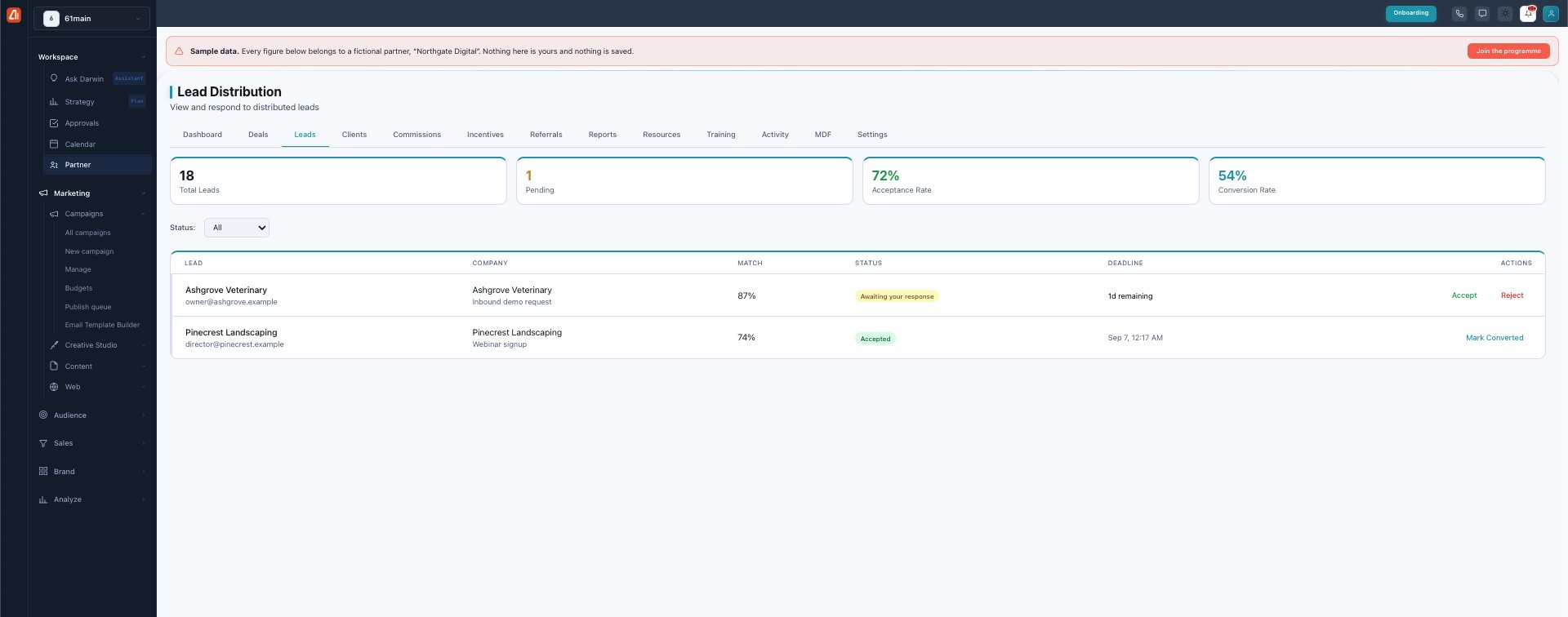
Lead Distribution — inbound leads matched to you, with a 48-hour response window.
The metrics
The top cards summarize your lead performance: Total Leads received, how many are Pending your response, your Acceptance Rate (accepted ÷ total), and your Conversion Rate (converted ÷ accepted). A high acceptance and conversion rate keeps quality leads flowing to you.
The match score
Each lead carries a match % — how well the lead fits your industry, region, and history. It helps you decide quickly which leads are worth accepting.
Accept, reject, or convert
Every lead moves through clear states, driven by your response:
| Status | What it means |
|---|---|
| Awaiting your response | New — the 48-hour clock is running (“1d remaining”). |
| Accepted | You took the lead; now work it and Mark Converted when it becomes a deal. |
| Rejected | You declined (a reason is required so matching improves). |
| Expired | The 48 hours passed with no response — it’s reassigned. |
| Converted | An accepted lead you turned into a deal. |
Accept and Reject sit on each row; once accepted, Mark Converted records the win. Use the Status filter to focus on what needs a response.
What’s next
- Back to the Partner Program overview.
- See Deals & registration.
- See Clients.
- See Commissions.
- See Incentives & SPIFs.
- See Referrals.
- See Reports & scorecards.
- See Resources.
- See Training & certification.
- See Activity.
- See MDF.
- See Settings.