
The Partner Program is how agencies, resellers, and affiliates earn lifetime commission by selling and referring Marketing Titan. The Partner area is your whole business in one place — a pipeline, leads, clients, commissions, bonuses, referrals, reports, training, and co-marketing funds. It’s free to join.
Where to find it: Left menu → Workspace → Partner. New partners see a Join the program button; sample figures belong to a fictional partner until you join.
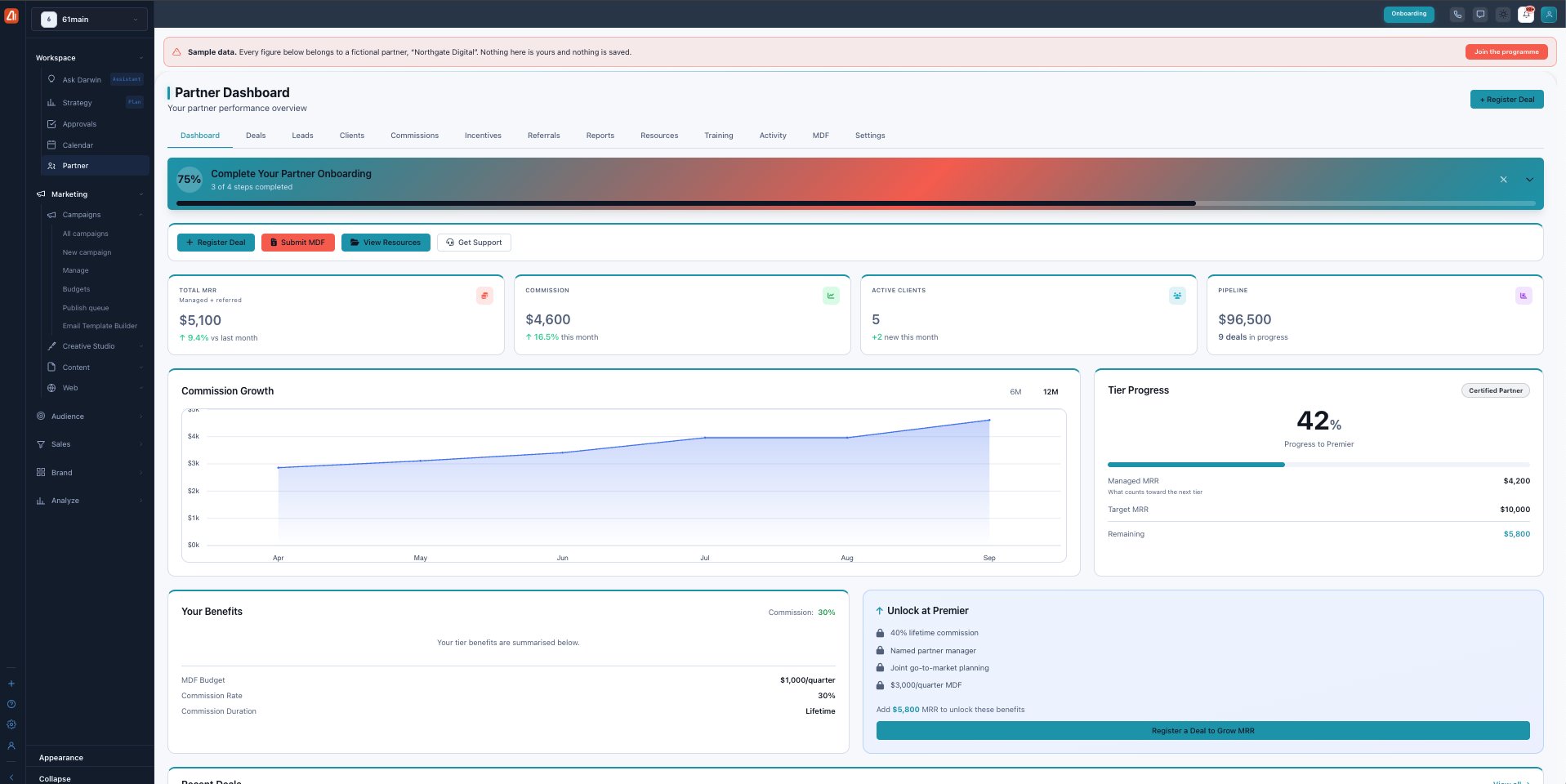
The Partner Dashboard — your performance, tier progress, and benefits at a glance.
The dashboard
Your landing tab is the Dashboard. An onboarding bar tracks setup steps, and quick actions let you Register Deal, Submit MDF, View Resources, or Get Support. Four cards headline your business — Total MRR (managed + referred), Commission this month, Active Clients, and Pipeline value — above a Commission Growth chart.
Tier progress & benefits
The Tier Progress card shows how close you are to the next tier (by MRR or client count), and Your Benefits summarizes your current commission rate, MDF budget, and commission duration. Unlock at Premier previews what the top tier adds.
The three tiers
Your tier sets your commission rate and perks. You move up by hitting either a client count or an MRR floor, plus the required certification:
| Tier | Commission | To reach it | Quarterly MDF |
|---|---|---|---|
| Affiliate | 20% lifetime | Default — just join | — |
| Certified | 30% lifetime | 5 clients or $2,500 MRR + Certified Consultant | $1,000 |
| Premier | 40% lifetime | 15 clients or $10,000 MRR + AI Agent Specialist | $3,000 |
Commission is lifetime at every tier — you keep earning for as long as the client stays. If you fall below a threshold you keep your tier for a 2-month grace period before it changes.
Every tab — each has its own guide
| Tab | What it covers | Guide |
|---|---|---|
| Deals | Pipeline + register prospects (90-day lock). | Open → |
| Leads | Accept/reject distributed leads within 48h. | Open → |
| Clients | Your accounts, MRR, and per-client commission. | Open → |
| Commissions | Earnings by state and payment history. | Open → |
| Incentives | SPIFs and bonuses on top of commission. | Open → |
| Referrals | Your link, UTM builder, and referral funnel. | Open → |
| Reports | Health score, scorecards, CSV export. | Open → |
| Resources | Decks, battle cards, case studies. | Open → |
| Training | Courses and tier-unlocking certifications. | Open → |
| Activity | A timeline of everything on your account. | Open → |
| MDF | Request and track co-marketing funds. | Open → |
| Settings | Profile, Stripe payout, tax docs, sandbox. | Open → |
Set up payouts first
Commission only reaches you once you connect Stripe and upload a tax form in Settings. Until then it accrues but isn’t paid — so do this before your first commission clears its 30-day hold.